Calculating stiffness tensor coefficients on the Rock Dependent Stiffness dialog
The Rock Dependent Stiffness dialog is accessed from the Stiffness Calculator tool when you click Show in the Show Rock Types section. The dialog is sub-divided in three sections (see figure below):
- Selecting Rock Types
- Defining the correlation for the coefficient log calculation for the selected rock type
- Assigning input parameters for the selected correlation
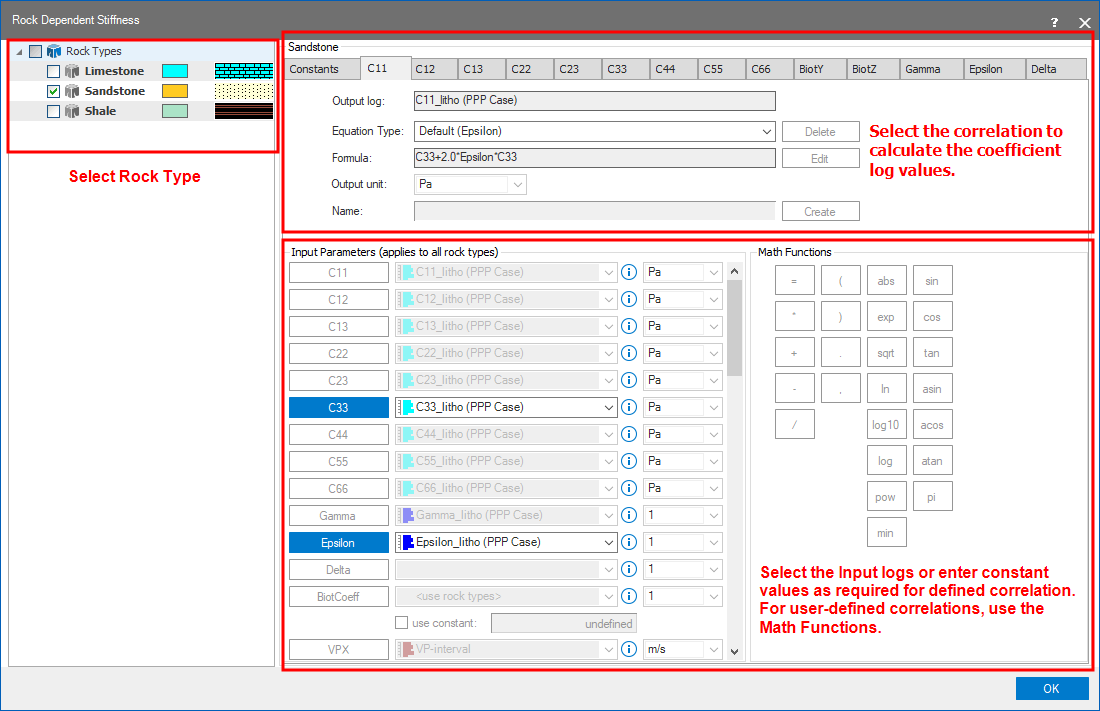
Dialog for the rock-dependent stiffness calculator. click to enlarge
In total, there are fifteen tabs on the dialog:
- Constants First tab to enter the inputs for rock mechanical properties and select the failure criteria.
- Stiffness tensor coefficients C11, C12, C13, C22, C23, C33, C44, C55, C66
- Biot's coefficients BiotY, BiotZ
- Thomsen coefficients Gamma, Epsilon and Delta
Equations
Defining correlations to calculate the coefficients logs
- On the left side of the dialog, select the Rock Type you want to calculate the coefficients for.
- On the right side, select the coefficient tab for which you want to define the correlation.
- Output log Shows the name of the output log (read only). Default name of the log: <coefficient>_litho (<1D case>)
- Equation Type Select the equation from the drop down to calculate the coefficient value. Each coefficient has their associated 'Default' equations to select from along with the option 'User defined'. When you create a user-defined equation, they are also listed here. Note that for Delta coefficient, you can only assign a user defined equation. Use the Delete button to remove an existing user defined equation.
- Formula This field is not editable for the 'Default' predefined equations. If you select 'User Defined' equation, you write the formula using the input parameters listed below. Use the operators in Math Functions section to define complex correlations as needed. The existing user defined equations can be edited by clicking on the Edit button. In the Edit function dialog, you can change the name and formula for the equation.
- Output unit This field is not editable for the 'Default' predefined equations. If you assign a user defined equation, you can change the unit from the drop down list.
- Name This field is not editable for the 'Default' predefined equations. For user defined equations, enter the name for the equation in the field and click on the Create button. Once the equation is created, it is then listed in the 'Equation Type' above.
- For the selected equation to calculate coefficient values, select the Input Parameters below on the dialog. Only the parameters used in the equation will be active and you can select the log from the drop down list, or enter the constant values as applicable.
- Once you complete defining equations for all the coefficients of interest, repeat the above steps for the remaining rock types.
- Validate all the missing inputs parameters. Click OK to close the dialog and save settings on the dialog.
On the Stiffness Calculator form, click (Re)Calculate to generate the coefficient logs and click Show to display the logs on the Stiffness Matrix Elements view.