Models Manager
On the Models Manager form (AI / ML > Models Manager), you can review all ML models existed in your solution, rename them, export any model to the external file and also import models from the external files. Note that only internal JewelSuite™ Geomechanics binary file format is supported (*.lpm).
The form has two sections:
- A model viewer section (on the left).
- A model metadata section (on the right).
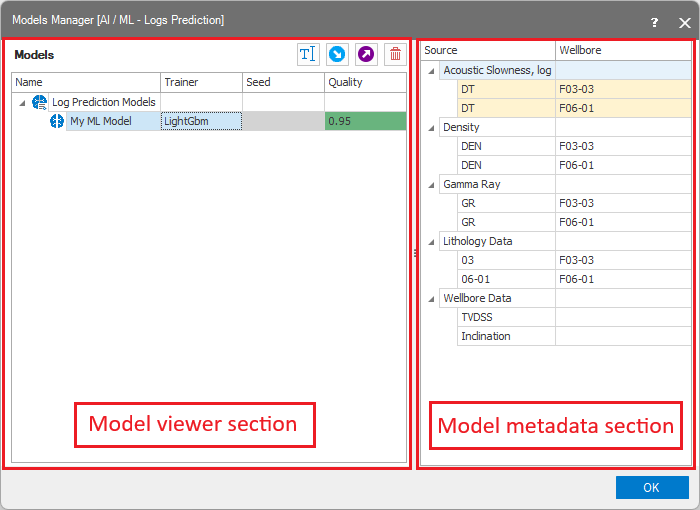
The two sections on the Model Definition form click to enlarge
Managing the models
In the model viewer section, you can see all ML models existed in your solution. Models table contains four columns to display main model parameters:
- Name - name of the model.
- Trainer - type of the trainer used to train the model. Note that trainer type is visible in abbreviated format. Full trainer type name is available in the tool-tip for the Trainer cell.
- Seed - the seed value used for model training. If default seed was used corresponded cell will be disabled.
- Quality - the quality of the model, i.e. the Coefficient of determination value (see the corresponded documentation section for the Logs Prediction form)
Select the model of interest by clicking once in the row. You can only select one row at a time. The selected row is highlighted in blue. You can manage selected model using the following toolbar buttons:
 Rename the model.
 Import the model from the external file.
 Export the model to the external file.
 Remove selected model.
Model's metadata
In the model metadata section, you can review the metadata of selected model. Each time when you train the model using the Logs Prediction form, the model stores the names of the objects used for training. No actual training data (i.e. log values, or wellbore trajectory) is saved. Note that rows that contains the names of logs used as Label are highlighted using the same color as corresponding Label-related rows in the Model Definition form. Having object names and the data structure (which together forms a model's metadata) could help you understand the data sources used for model training. That could help to make a decision about the model which is more suitable for your current solution data.