Model Definition
You use the Model Definition form to specify the calculation mode, and the input for defining mud weight, for the calculations performed in the Borehole Stress sub-strip. Depending on the selections you make on this form, different options become active.
Calculation mode
Log based - Select this option to do all the calculations for the specified depth range of the log. After selection, the Min and Max fields are activated where you can specify the range of log depth either in MD or in TVDRT. Optionally, at the lower part of the form you can specify the sampling rate. You can choose between depth frequency or number of samples. Check the option of your choice and enter a value. If you do not select either option, the sampling rate from the input log is used.
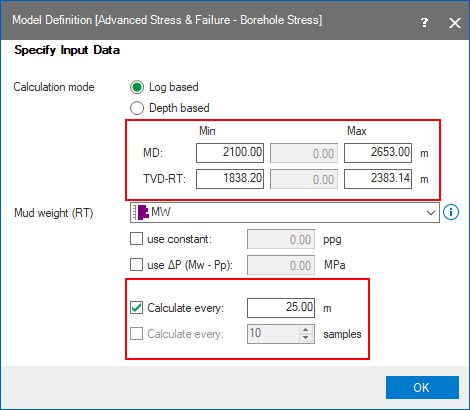
The depth range and the sampling information in the bottom part of the form is only enabled when the selected calculation mode is Log based click to enlarge
Depth based - Select this option to do the calculations at one specified depth. Enter a depth in the MD entry box that is enabled when you select the depth based option and press Tab or Enter. The TVDRT and MD entries are linked. When you enter a value for one, the other is updated immediately.
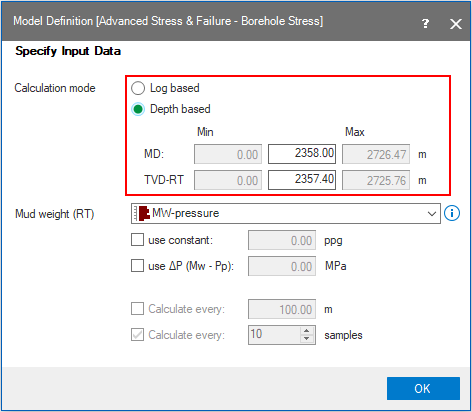
When the selected calculation mode is Depth based, the entry boxes for depth are enabled click to enlarge
Mud Weight
Choose one of the following options:
Select log - From the drop-down list, select the log of interest. The drop-down list is populated with logs of the type Pressure, Mud Weight and Equivalent Mud Weight.
Use constant - Check this option and enter a value if you want to use one constant value for all the calculations.
Use  (Mw-Pp) - Check this option and enter a value. Based on the difference between the entered value and the pore pressure log, a value is calculated for MW and used in the other calculations in the Borehole Stress sub-strip.
Click OK to save your settings.