Surface Table
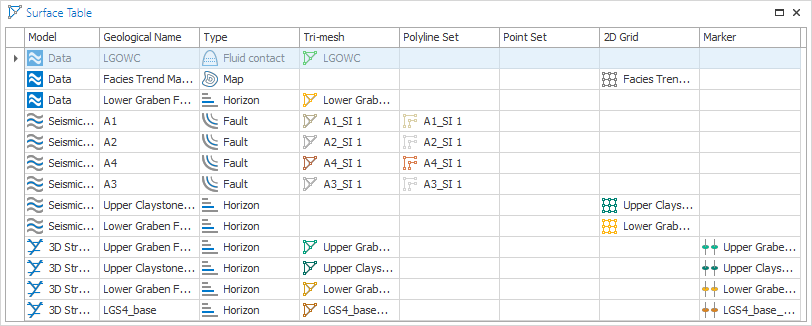
Surface table click to enlarge
With the Surface Table you can create an overview of the existing representations for surfaces (e.g. horizons, faults, fluid contacts, etc.) in your solution. To do this, check the checkbox(es) of the surface(s) that you want to inspect in the JewelExplorer to populate the view (the Surface Table opens empty). Cells for which no data is present are empty.
You can use the context menu in the view (right-mouse click on a row) to assign a representation (e.g. a marker) to a surface with a different name using the 'Associate and rename to' option. If this surface is used in multiple models, first decouple the surface from the other models. The context menu also has the option to disassociate, e.g. you can disassociate a marker from a surface.
Names in the column Geological Name are editable. If you change the geological name of a surface, this name will be used in all models where that surface is present.