Static Kick Tolerance table
You can consider kick volume, density, and intensity in the Predict Mud Weight workflow by activating the Consider static kick tolerance option in the Specify mud window step (or from Wellbore Stability > Predict Mud Weight > Tools > Static Kick Tolerance). You can define these parameters in the Static Kick Tolerance view, opened via the Show button adjacent to the Consider static kick tolerance checkbox. When activating this option an additional column for Mud Weight Kick Tolerance (MW KT) is displayed in the table. The values in this column are generated after the parameters are defined in the Static Kick Tolerance view and you recalculate the mud window.
Visualizing the kick tolerance
You can visualize the kick tolerance result in the Predict Mud Weight view as a vertical dashed line or set of lines. The color of the mud windows also change to reflect issues indicated by the kick tolerance. A green colored mud window indicates a safe range of operation, as it does normally in the Predict Mud Weight View. Likewise, a red mud window indicates failure. Unique to this kick tolerance mode is a yellow colored mud window that indicates a kick tolerance limit that is below the minimum mud window or fully outside of the mud window.
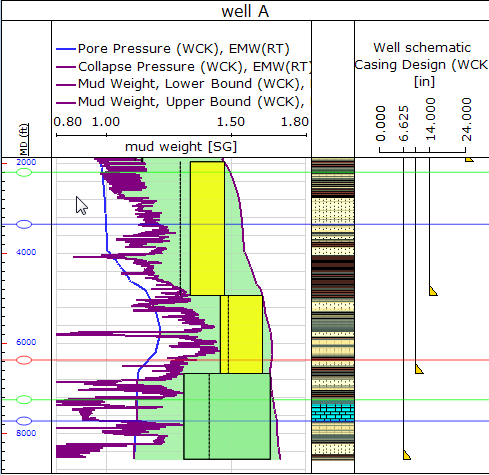
Kick tolerance in a Predict Mud Weight view click to enlarge