Well rates ASCII file format
PROPERTY WELLRATE Name
REFERENCE ReferenceName
[CATEGORY Category]
[SUBCATEGORY SubCategory]
[PTYPE PropertyTemplate [PropertyUnit]]
[UNKNOWN UnknownValue]
[TIMEUNIT TimeUnit]
[STARTTIME StartTime]
Time Value
....
Keywords (the order of these keywords does not matter, except from the OBJECT keyword – this keyword should always be the first one – and that the Readings are always at the end)
| Keyword | Description | Optional | Comment |
|---|---|---|---|
|
WELLRATE |
Specifies the property type |
No |
One value is expected: 1. Name of the wellrate |
|
TIMEUNIT |
Specifies the time units |
Yes |
One value is expected: 1. Time unit (Default = days) For the Time the unit can be: 1. days – default unit 2. weeks 3. months 4. year When this keyword is not included, the default unit is applied |
|
STARTTIME |
Specifies the absolute start time of the rate values |
Yes |
One value is expected: 1. Start time (Default = none) When this keyword is not included, there are two options: 1) if the rate time values are specified as absolute values (dates), the first absolute date is used as start time 2) if the rate time values are specified as relative values (days), no start time will be set; the rate values will than only be available as relative dates |
Variables
| Variable | Description | Type | Min | Max | Comment |
|---|---|---|---|---|---|
|
TimeUnit |
Time unit to be used |
string |
- |
- |
Default = days |
|
StartTime |
Absolute start time to be used |
date |
- |
- |
If absolute time values specified: Default = first time value If relative time values specified: Default = none; no absolute start time will be used |
|
Time |
Time value |
int |
- |
- |
Specification of the time in days |
|
Value |
Well rate value at specified time |
double |
- |
- |
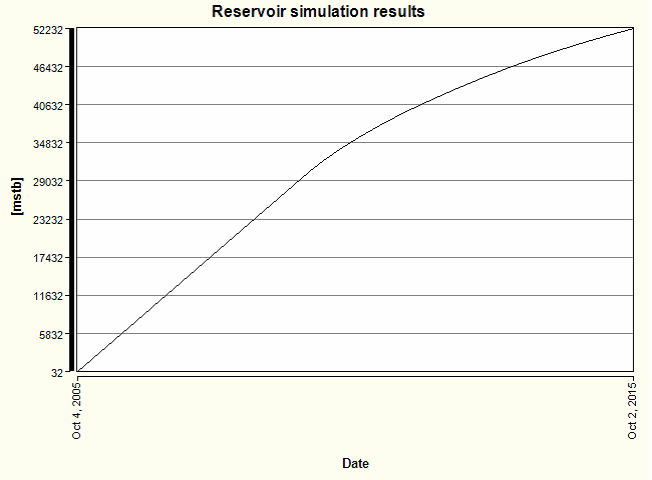
Example 1 (absolute times)
PROPERTY WELLRATE CumulativeOil
PTYPE Well Production mstb
CATEGORY SimulationCase1
SUBCATEGORY Well1
5-Oct-05 31.6
7-Oct-05 79.3
11-Oct-05 143.2
13-Oct-05 188.7
17-Oct-05 279.7
...
17-May-15 51353.2
25-Jun-15 51610.9
5-Aug-15 51868.8
15-Sep-15 52125.6
2-Oct-15 52231.5
click to enlarge
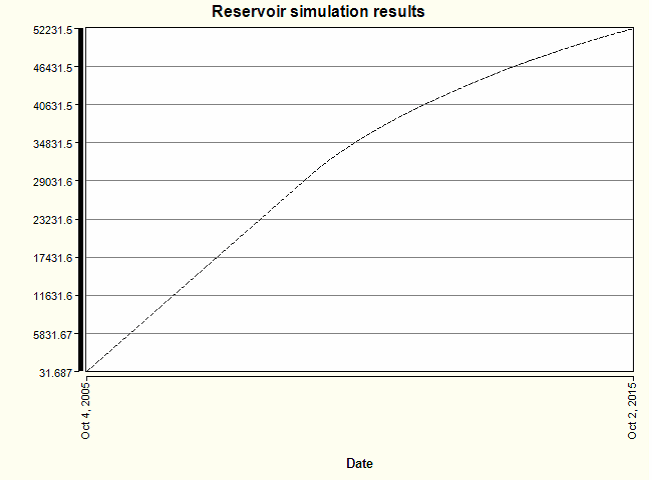
Example 2
PROPERTY WELLRATE CummulativeOil2
CATEGORY SimulationCase2
SUBCATEGORY Well2
STARTTIME 5-Oct-05
0 31.6
2 79.3
6 143.2
8 188.7
12 279.7
...
3511 51353.2
3550 51610.9
3591 51868.8
3632 52125.6
3649 52231.5
click to enlarge
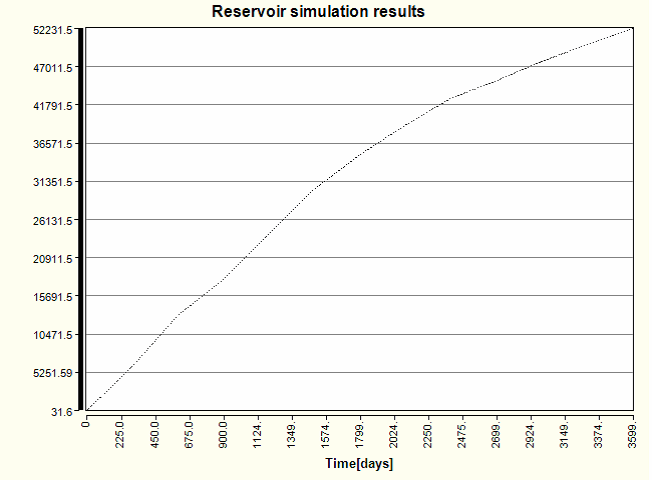
Example 3 (minimum / all optional fields left out)
PROPERTY WELLRATE CummulativeOil3
0 31.6
300 6035.3
600 13026.2
900 17950.7
1200 24139.8
1500 30318.1
1800 35008.9
2100 39053.1
2400 42709.2
2700 45114.2
3000 47766.5
3300 50036.8
3600 52231.5
click to enlarge
The Grid properties ASCII file format is as follows (NOTE: CSYSTEM, UNITS and COLOR keywords are not used for Grid properties):
PROPERTY GRIDPROPERTY Name
REFERENCE ReferenceName
[CATEGORY Category]
[SUBCATEGORY SubCategory]
[PTYPE PropertyTemplate PropertyUnit]
[UNKNOWN UnknownValue]
DIMENSIONS NumberNorth NumberEast NumberDepth StepNorth StepEast StepDepth
PropertyValue(0) .....
.....
..... PropertyValue(NumberNorth*NumberEast*NumberDepth-1)
Keywords (the order of these keywords does not matter, except from the OBJECT keyword – this keyword should always be the first one – and that the Readings are always at the end).
| Keyword | Description | Optional | Comment |
|---|---|---|---|
|
GRIDPROPERTY |
Specifies the property type |
No |
One value is expected: 1. Name of the wellrate |
|
DIMENSIONS |
Specifies the voxelgrid dimensions |
No |
Six values are expected: 1. Number of cells in Easting direction 2. Number of cells in Northing direction 3. Number of cells in Depth direction 4. Cell size in Easting direction 5. Cell size in Northing direction 6. Cell size in Depth direction |
Variables
| Variable | Description | Type | Min | Max | Optional | Comment |
|---|---|---|---|---|---|---|
|
NumberNorth |
Number of cells in northing direction |
int |
1 |
>=1 |
No |
Minimum 1 cell |
|
NumberEast |
Number of cells in easting direction |
int |
1 |
>=1 |
No |
Minimum 1 cell |
|
NumberDepth |
Number of cells in depth direction |
int |
1 |
>=1 |
No |
Minimum 1 cell |
|
StepNorth |
Cell size in northing direction |
double |
>0 |
>0 |
No |
Size should be bigger than 0 |
|
StepEast |
Cell size in easting direction |
double |
>0 |
>0 |
No |
Size should be bigger than 0 |
|
StepDepth |
Cell size in depth direction |
double |
>0 |
>0 |
No |
Size should be bigger than 0 |
|
PropertyValue |
Property value at a cell center |
double |
- |
- |
No |
Property values are ordered in east direction first, then north, then depth. First property value is located in north-west top corner (e.g. I=1, J=1, K=1). |
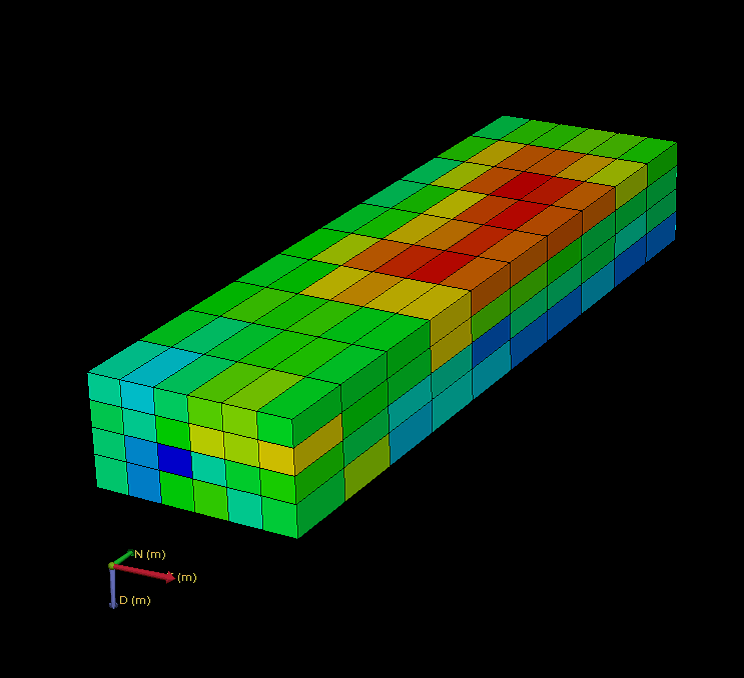
Example 1
PROPERTY GRIDPROPERTY PorosityImported
REFERENCE spe10
PTYPE Porosity volume fraction
CATEGORY IMPORTED
DIMENSIONS 220 60 85
0.184778 0.191699
0.159089 0.151273
0.123168 0.112611
…..
0.373206 0.301715
0.290212 0.262111
0.275566 0.275033
click to enlarge
Example 2 (minimum / all optional fields left out)
PROPERTY GRIDPROPERTY PorosityImported
REFERENCE spe10
DIMENSIONS 220 60 85
0.184778 0.191699
0.159089 0.151273
0.123168 0.112611
…..
0.373206 0.301715
0.290212 0.262111
0.275566 0.275033
click to enlarge