Different display options for wellbore trajectories
When you visualize wells in a 2D or 3D View, you can use the Display Settings available in the context menu of the well or wellbore to visualize the wellbore trajectories in a variety of ways.
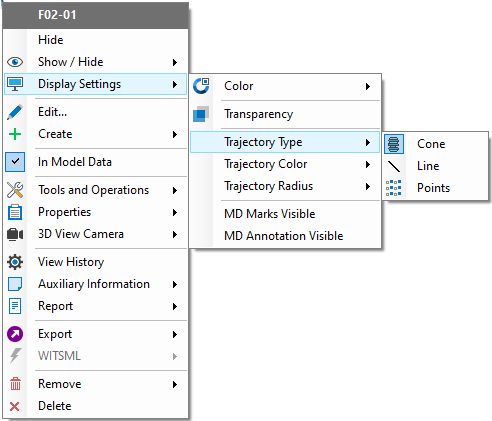
Use the Display Settings options of a well or a wellbore to change the way the wellbore trajectory is visualized. click to enlarge
If you have selected Line or Points as Trajectory Type, you cannot change Trajectory Color and Trajectory Radius. By default, the color of the trajectory is set to the color of the wellbore, and radius is not relevant. The width of the wellbore trajectory is set using Wellbore thickness in the Property Inspector.
If you have selected Cone as Trajectory Type, the Trajectory Color and Trajectory Radius options are available for selection as well.
Trajectory Color Select from the following options to set the color:
- Wellbore Color Display the wellbore trajectory using the same color that is set for the wellbore.
- Color Property Display the wellbore trajectory using the default color set for the selected log property (see Property Templates). When there is no log data, the wellbore trajectory is gray.
Trajectory Radius Select from the following options to set the radius (for the cone):
- Constant Display the wellbore trajectory using a constant radius. You can combine this option with the Size option.
- Radius Property The radius of the wellbore trajectory is based on the values of the selected log. The higher the values, the wider the trajectory. You can combine this option with the Size option.
- Size Select a % from the context menu and the radius of the wellbore trajectory is updated accordingly.
Some examples:
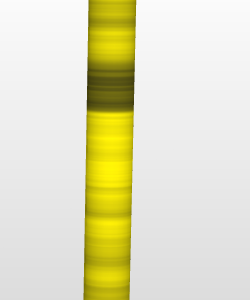
Displaying the wellbore trajectory using the colorset of the selected log, radius constant. click to enlarge
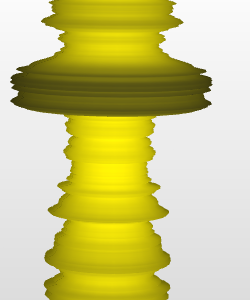
Displaying the wellbore trajectory using the colorset of the selected log, and using the same property as radius. click to enlarge
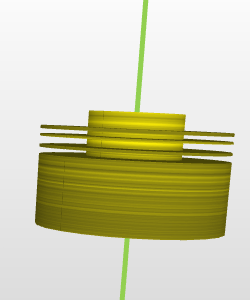
Displaying the wellbore using the colorset of the selected log, and using a different property as radius. Only where the property selected as radius is available for the wellbore, the radius of the wellbore is based on that property. For the rest of the wellbore trajectory, the radius of the wellbore is reset to default (wellbore thickness in the Property Inspector), as well as the color (which is the wellbore color). click to enlarge