JewelScript from Concept
With the JewelScript from Concept form in the Concept Tools button group (Concept > Concepts > Tools), you create a JewelScript based on the concept definition for a volumetric scenario. JewelScripts generated from this tool are read only executable scripts and cannot be edited.
JewelSuite Subsurface Modeling utilizes the in-built automation capability of the JewelScript Editor tool to create a JewelScript that is based on the domain models associated with the concept-of-interest. The domain models (3D structural model, 3D grid, facies model, porosity model, etc), that form the backward chain of generating the saturation model and the NTG model, will be integrated in the JewelScript Editor as script items with their respective domain model inputs. The script items will be arranged in the ascending order of execution of domain models which can also be referred from the Dependencies Analyzer form.
The JewelScripts created with this tool are stored in the Script Explorer and can also be accessed via the JewelScript Editor tool.
Creating a JewelScript from a concept
- On the form, select the volumetric scenario from the Model drop-down list. The concepts assigned to the volumetric scenario are filtered for the next step.
- Select the Concept that you want to create the JewelScript for from the drop-down list.
- Based on your selection in the previous steps, a default Name for the JewelScript is generated in the adjacent field with the naming convention: Concept-<volumetric scenario name>-<concept name>.Important If the JewelScript created from the selected Concept already exists in the solution, it will be overwritten.
- Click Apply to create the script and keep form open, or click OK to create the script and close the form.
Creating multiple JewelScripts for all the concepts assigned to a volumetric scenario
- On the form, select the volumetric scenario from the Model drop-down list. The concepts assigned to the volumetric scenario are filtered for the next step.
- Select All from the Concept drop-down list.
- The Name entry field shows ... and is not editable. A JewelScript is created for every concept assigned to the volumetric scenario, with the naming convention: Concept-<volumetric scenario name>-<concept name>.Important If the JewelScript created from the selected Concept already exists in the solution, it will be overwritten.
- Click Apply to create the scripts and keep form open, or click OK to create the scripts and close the form.
Access the newly created JewelScript(s) in the Script Explorer or via the JewelScript Editor tool. On the JewelScript Editor form, use the toolbar options to duplicate, rename or delete the script. In the JewelScripts section on the form you can deselect script items that you want to exclude before running the script. Note that you cannot add any new script items from the Script Item Catalog, or modify or rearrange the script items.
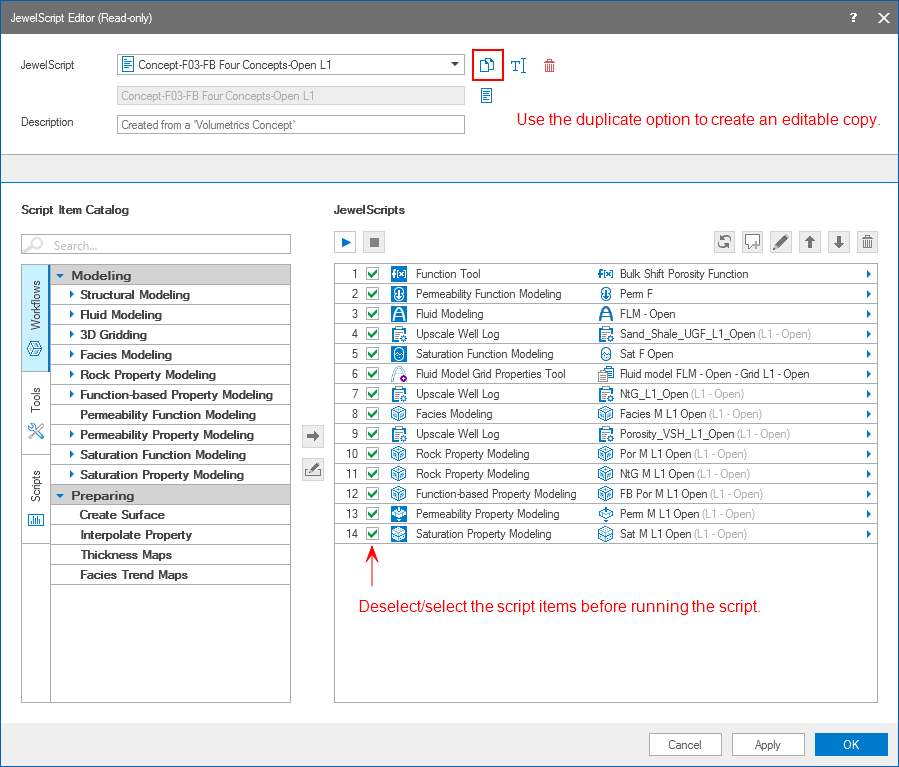
An example of the script generated from the JewelScript from Concept tool. click to enlarge
To modify the (read only) script generated from the tool, use the Duplicate button from the toolbar options to make a copy of the script. You can then add or remove scripts items, change the ordering of script items, or modify the input definition of the intermediate steps in script items.