The Volumetric Concepts workflow
With the Volumetric Concepts workflow (concept > Concepts > Volumetric Concepts) you can generate one or more volumetric concepts, which are contained in a volumetric scenario. Defining one or more concepts is a requirement to perform volumetric uncertainty calculations with the study strip.
A volumetric concept is one set of domain models representing one conceptual idea of your reservoir model (e.g., stratigraphic model, a structural model, a 3D grid, fluid model, etc.). As these domain models are interdependent, the saturation model (which is at the end of the 'modeling chain') automatically determines all backward dependent domain models. In other words, by choosing the saturation model (which you do in the third step of the workflow, i.e., 'Assign Models'), all backward dependent domain models of the saturation model are automatically assigned to that concept. The input dependencies of the domain models can be analyzed in the Dependencies Analyzer tool.
The domain models in the concept(s) can optionally contain parametric uncertainties. These are uncertainties which are related to input parameters which you specify on the workflow forms (e.g., the fluid level of a fluid model) and which are defined by Probability Density Functions (PDFs). Once defined, a single value for each parameter distribution is sampled per realization. In the application, the parameters for which you can define parametric uncertainty can be recognized by a symbol ( ) next to the parameter's entry field on the workflow form. Clicking on the symbol will open an Uncertainty Parameter dialog where you can specify the PDF for the input parameter. For a volumetric uncertainty calculation, the PDFs are sampled during the uncertainty calculation with the STUDY strip.
Multiple volumetric concepts, each one with its own underlying conceptual idea, can be combined into one volumetric scenario. Reasons for having multiple model versions in your project can be progressive insight (first-pass vs. technical best), work in progress (half-finished models) or to capture conceptual uncertainties in your data (see Incorporating conceptual uncertainties with the concept strip).
Once you have finalized the Volumetric Concepts workflow, the volumetric scenario contains:
- One or more volumetric concepts, each one consisting of a sequence of domain models. These domain models optionally contain parametric uncertainties, but do not have to.
- (optionally) Conceptual uncertainties assigned to the concepts or domain models (this is done with the Concept View).
In the process of creating volumetric concepts, three main phases can be distinguished:
- Ideally, you create one or more volumetric concepts at an early phase of the project, comparable to project framing sessions, where understanding the limitations of geo-statistics and uncertainty in the interpretation are assessed. At this stage, the concept(s) are only administrative (they contain descriptions, no domain models yet).
- As the project evolves and insight progresses, domain models (e.g., a Structural Model, a Saturation Model, etc.) are generated and assigned to modeling steps. Simultaneously, existing concepts are updated and new ones added as a result of better understanding and newly interpreted data.
- Conceptual uncertainties are quantified in the form of weight factors assigned to domain models and/or volumetric concepts. At this stage, the volumetric concepts are ready to be used as input to calculations with the study strip.
The volumetric concepts workflow works together with the Concept View. The Concept View is a graphical display of the volumetric scenario and the volumetric concept(s) it contains. An abstract example of a volumetric scenario with four volumetric concepts is given in the image below.
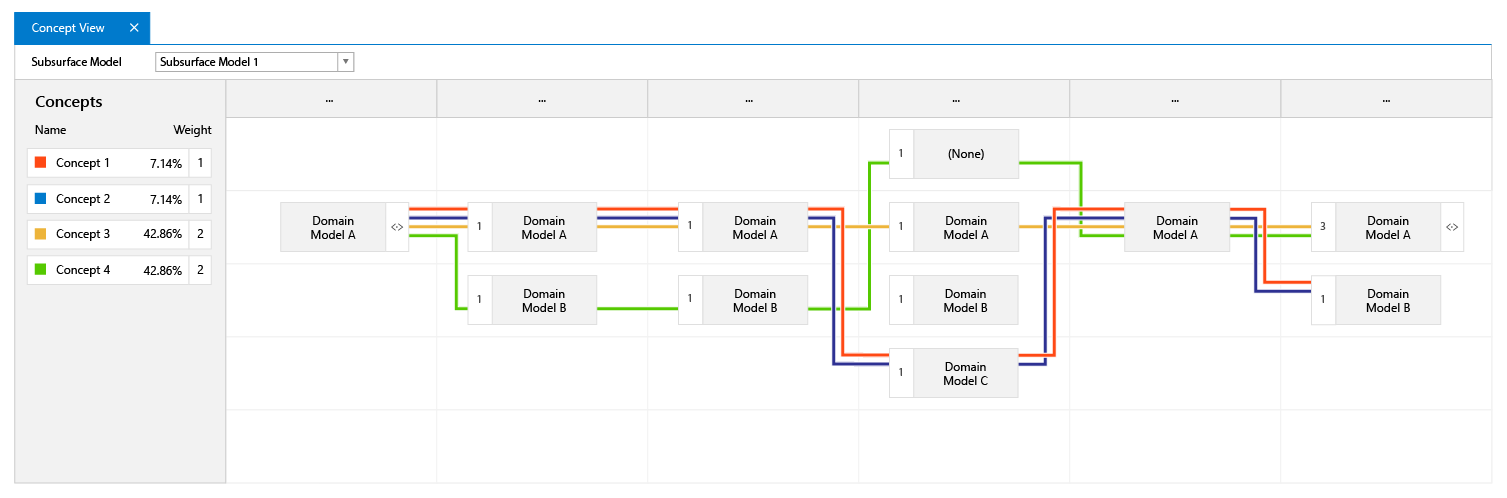
Abstract example of volumetric concepts as displayed in the Concept View. Each horizontal (colored) line is one volumetric concept, passing through the modeling steps represented by the columns (modeling steps are represented by ellipses at the top of each column). When a domain model has been assigned to a concept, its name is shown in the respective column. When no domain model has been assigned, the (non-existing) domain model is shown as 'None'. click to enlarge
Probabilities can be assigned to domain models and/or concepts in the form of weight factors. Any parametric uncertainty that has been applied to model parameters is shown on the respective models in the view as well. This way the view gives an overview of the concepts, the assigned model per modeling step and assigned uncertainties, which are used as input to calculations with the study strip.
For information on the steps of the Volumetric Concept workflow, see: