Cross Section context menu
Hide (Show) Hide or show it in your view.
Object Visibility Control Switch between the standard 3D View visibility control and the Cross Section 3D View visibility control.
Display Settings
Color Pick a color to display it in the view.
Mesh Color Pick the color to be used to display the mesh.
Render Mode Display it as a solid surface, as a wireframe, or as a solid surface with wireframe mesh. For a surface in a 3D mesh model, you can also select to display as a solid surface with wireframe mesh and nodes, as a solid surface with nodes, as a wireframe, as a wireframe with nodes or as nodes only.
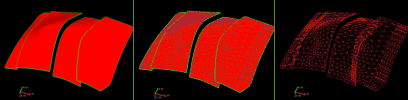
Render modes. Left to right; solid, solid with wireframe mesh, and wireframe mesh only. click to enlarge
Transparency Make it semi-transparent. Adjust the opacity value from the Property Inspector.
Lighting Turn a lighting effect on or off. The lighting effect can enhance the visibility of contours.
Draw Image on Cross Section Display an image on the cross section. Select from the list of images in your solution.
Show Canvas Show or hide the outline and background of the cross section plane.
Show Cross Section Display Area Display the area of the cross section which is currently visible in a general Cross Section view.
Use as Clipping Plane Use the cross section as clipping plane for all objects in the 3D View.
Duplicate Create a copy and place it in the same folder in the JewelExplorer.
Show Cross Section View Shows the cross section in a dedicated view.
Create Well Group Creates a new well group that includes all of the wells within the specified well projection distance of the cross section. This distance can be reviewed and changed in the Inspector. First, click the cross section in the 3D View or the JewelExplorer to make it the active item in the Inspector, then find and change the Wellbore projection distance option in the Geometry option group.
Delete Delete the object from the solution. Depending on the type of object, geometric representations, subfolders or objects it may contain are deleted as well.