Using Local Grid Refinement (LGR)
Important
A grid that has been locally refined cannot be exported to formats other than the joagridset.
Using the options available under the Local Grid Refinement button in the model > 3D Grid > Modify Grid buttongroup, you can locally refine an existing grid. First, with the LGR Split Definition option, you set up the refinement of your 3D Grid, after which you define the grid area for refinement with the LGR Creation option. Once the LGR is created, you can synchronize and upscale/downscale selected grid cell properties.
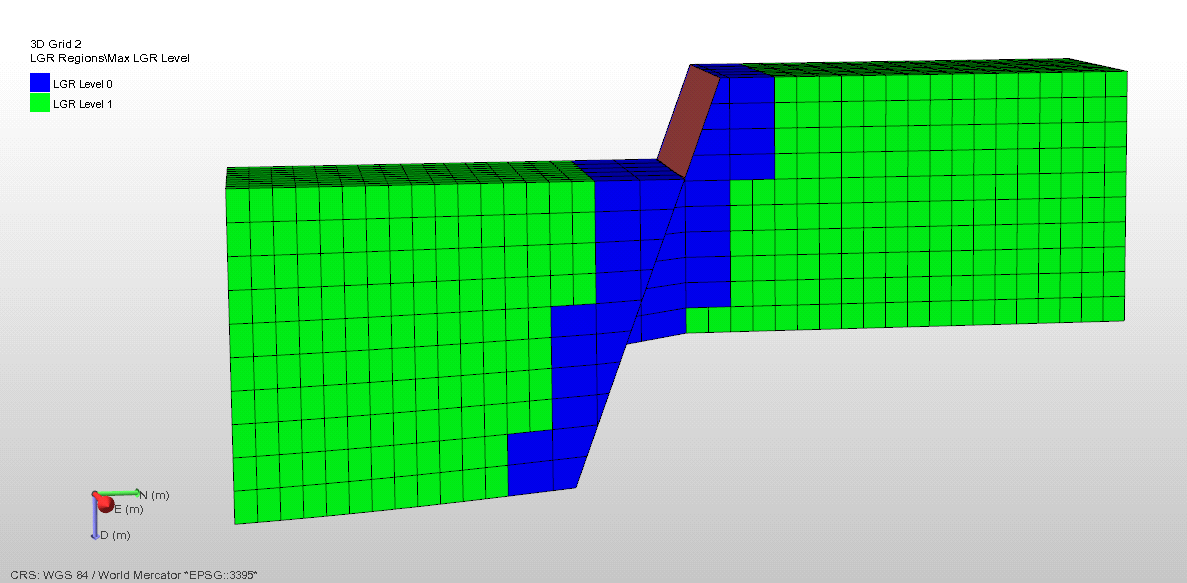
Note that local grid refinement cannot be applied near discontinuity surfaces: alongside discontinuity surfaces (i.e. faults and unconformities/intrusions in the fault model) there will be two adjacent cells to which LGR is not applied, see image below.