To QC depth and thickness uncertainty
With the QC Uncertainty tool (model > 3D Structure > Tools > QC Uncertainty) you can QC the uncertainty settings which you specified in the Depth and Thickness Uncertainty workflow. There are two ways; you can QC depth shift maps, or you can QC 'explicit surfaces' (i.e. tri-meshes), generated based on the shifted realizations. On the form, you select either one of these options:
- Depth shift preview maps - With this option, you generate one realization of depth shift maps for all(*) surfaces. Where the 'Preview' option on the individual workflow forms of the Depth and Thickness Uncertainty workflow only show dept shift maps based on one particular uncertainty (e.g. 'seismic thickness' or 'depth'), the QC Uncertainty form generates depth shift maps based on the combined settings of depth, seismic and sub-seismic uncertainty. Depth shift maps generated with the QC Uncertainty tool are the preferred way to QC the effect of your uncertainty settings on a surface by surface basis.
- Explicit surfaces in surface set - With this option, you generate one or more realizations of shifted surfaces(*) as 'explicit surfaces' (i.e. tri-meshes). Each realization shows the combined effect of the 'Depth', 'Thickness (Seismic)' and 'Thickness (Sub-Seismic)' forms on the model horizons. Each realization is saved in a separate Surface Set folder. 'Explicit surfaces' is the best way to explore the uncertainty space between the high and low cases (see image below). In case you want to use 'explicit surfaces' as input to a new structural model, see Creating explicit surfaces for a (new) structural model.
(*) All surfaces bounding the seismic and sub-seismic intervals (up to and including the selected 'stratigraphic level') as shown in the tables on the Define Uncertainty form.
Note that the settings and controls on the QC Uncertainty form will not in any way affect the uncertainty realizations of the Volumetrics Study workflow of the study strip.
Some tips on 'explicit surfaces'
- When entering the number of surface sets (i.e. 'realizations') on the form and in case of big models which need much computation time, it is recommended to use single-digits or low double-digits.
- Verify whether 'well correction' settings are set on the Well Correction form. Both 'QC Uncertainty' and your volumetric study with the study strip will use these settings.
- You can create a cross section to QC the spread of your realizations and your well correction settings (see image below). For optimal QC, create a cross section through wells using the Cross Sections form. To do this, open the cross section drop-down list in the toolbar of the 3D View (
 ) , and select 'Open Cross-Section Form'. On the form, select 'Vertical section' and 'Wells' so that the cross section will run exactly through the well locations, see Working with cross sections.
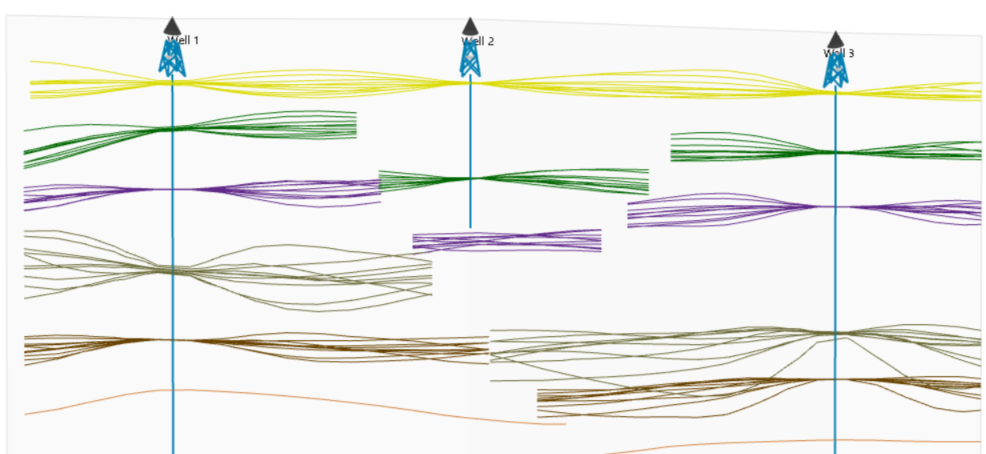
Output of 'explicit surfaces': cross section (select type 'Vertical section' on the Cross Sections form) showing ten realizations for five surfaces impacted by depth and thickness uncertainty. click to enlarge
To generate shift maps or 'explicit surfaces'
Structural Model Select the Structural Model for which you want to generate depth shift maps or 'explicit surfaces'.
Resample all depth and thickness uncertainty parameters The seed/multiplier values on the 'Depth', 'Thickness (Seismic)' and 'Thickness (Sub-Seismic)' forms will be resampled when generating the output as selected under the 'Output' section on the form. Always check the 'resample' box when you generate more than one realization for 'explicit surfaces', else all realizations will be identical.
Output
Select the output of your choice. See the introduction above for more on each option:
- Depth shift preview maps Generates a depth shift preview map per shifted surface, based on the combined (hierarchically handled) stochastic inputs of the Depth and Thickness (Seismic/Sub-Seismic) input forms.
- Explicit surfaces in surface set Generate a tri-mesh per shifted surface based on the combined (hierarchically handled) stochastic inputs of the Depth and Thickness (Seismic/Sub-Seismic) input forms.
- Number of surface sets This is the number of realizations that will be generated. Each realization will be saved in a separate surface set. Enter the number of realizations you want to run. If you generate more than one realization, make sure the 'Resample all depth and thickness uncertainty parameters' checkbox is checked, else each realization will be identical.
- Create horizon clean-up properties Use this checkbox if you want to use the explicit surfaces as input to a (new) structural model. See Creating explicit surfaces for a (new) structural model.
Click Apply or OK to generate the preview maps or surface sets with 'explicit surfaces'.
Generated output in the JewelExplorer
For 'depth shift preview maps':
- A map called 'Preview Shift Map' (a 2D grid) is added to the Data > Maps > Depth and Thickness Uncertainty folder in the JewelExplorer, with the property 'Depth' representing the depth shift.
- The map is automatically visualized in the 3D View (you can also visualize it in a 2D View (Workspace > 2D View).
Apart from the 'Depth' property, the Preview Shift Map contains the following properties:
- Property 'Depth uncertainty method values' - For SGS, this is the normalized depth shift map generated by SGS and before multiplication with your global or local standard deviation (the property is unit-less with standard deviation = 1 and mean = 0). For Multiplier method, this is the sampled multiplier value (the property is unit-less with standard deviation as specified on the Uncertainty Parameter dialog).
- Property 'Depth standard deviation' - This is the standard deviation map, displaying either the global standard deviation value or the local standard deviation map as provided by you. This property is in SI units.
- Property 'Depth Shift Before Well Correction' (only for surfaces that shift and for which 'well correction' has been set on the Well Correction form) - This property shows the depth shift of the surface before well correction has been applied. You can compare this property with property 'Depth' to see the impact of the well correction.
For 'explicit surfaces':
Per realization a surface set is generated in the Surface Sets folder with the name convention 'Explicit Surfaces_<name of Structural Model>'. Each surface set contains the shifted surfaces as tri-meshes. If you checked the checkbox Create horizon clean-up properties, each tri-mesh contains two 'active properties' which are used during the construct surfaces step when you use the explicit surfaces as input to a new structural model, see Creating explicit surfaces for a (new) structural model.