Refining your selection
On the Refine Selection form, you can change the selection of wells to be included in the facies trend map calculation.
To refine your selection
- On the Refine Selection form, select the facies trend map from the Facies trend map drop-down list.
- From the Well group drop-down list, select the well group that contains the wellbores you want to use. The table on the form will only include the wells which actually have markers for the top and base events that you selected in the Assign Data step.
- Exclude wells with an inclination above ... degrees If the inclination of the wellbore within the specified interval (i.e. between the top and base events) is exceeding the specified angle, the wellbore will not be used in the calculations.
- Minimum data coverage in zone per well If the data coverage along the wellbore within the specified interval (i.e. between the top and base events) is less than the specified minimum percentage, the wellbore will not be used in the calculations. Data coverage refers to the percentage of the wellbore which has defined data.
- The table shows an overview of facies fractions along the wellbore within the specified interval (i.e. between the top and base events). These fractions represent the probability of occurrence of a certain facies class at that location. The sum of the probability values of all facies classes at the same location is equal to 1. Uncheck the wellbores you do not want to include in the calculations.
- Calculation Settings For deviated wellbore trajectories with curvature, the options in this section make a difference in calculations.
- TVDSS Select this option if you want to calculate facies fractions based on true vertical depth.
- MD Select this option if you want to calculate facies fractions based on measured depth, i.e. depth along the wellbore trajectory.
- Center At the midpoint of the top and base markers.
- Top Marker At the top marker.
- Base Marker At the base marker.
- Click Apply to save your changes and keep the form open, or click OK to save your changes and proceed to the Interpolate Map step.
For example, if this angle is specified as 80°, the wellbores which have an inclination higher than 80° will be ignored.
Inclination is the angle by which the wellbore deviates from the vertical. For a vertical wellbore inclination is 0°; for a horizontal wellbore inclination is 90°. Inclination can be greater than 90° if the well is drilled upwards.
For example, if the minimum data coverage is specified as 0.7 and if a wellbore has a data coverage of 0.6 (i.e. 0.6 of the wellbore has defined data and 0.4 of the wellbore has undefined data), the wellbore will be ignored.
Depth Type You can calculate the facies fractions based on two different depth types:
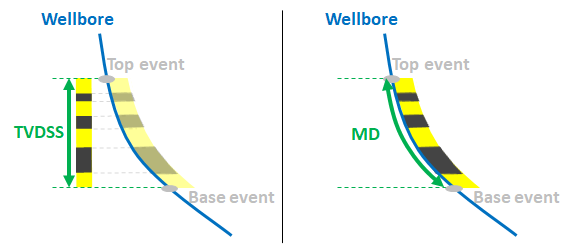
The options for depth type. click to enlarge
Value location The location of the extracted data value (i.e. facies fractions) can be based on the following:
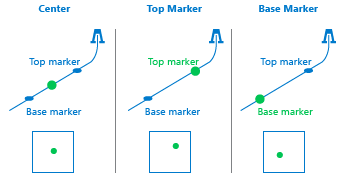
The options for value location. click to enlarge