Assigning data to a permeability function model
On the Assign Data form (model > Permeability > Permeability Function Modeling > Assign Data), you assign logs of the rock properties that you will use in your function. Among the rock properties, porosity is the primary property that is mostly used to define a correlation with permeability. As an option, you can also specify an additional property, such as irreducible water saturation (Swirr), shale content (Vsh), etc., to include in your function. This additional property might be a variable which allows you to better identify the reservoir heterogeneity, and thus better predict permeability and the fluid flow in the reservoir.
The assigned log sets are later used as input when you create permeability logs based on your function model via the Permeability Logs tool (model > Permeability > Tools > Permeability Logs).
To assign data to your permeability function model
- On the Assign Data form, select the permeability function model from the Function model drop-down list.
- Select the log sets you want to assign from the Facies, Porosity, Additional property drop-down lists. Assigning these log sets is optional.
- Assigning a Facies log enables you to define a permeability function per facies class.
- Assigning a Porosity log enables you to define permeability as a function of porosity.
- Assigning an Additional property log enables you to include any property of interest in your permeability function.
- Click Apply to assign the properties and keep the form open, or click OK to assign the properties and proceed to the Permeability Functions form.
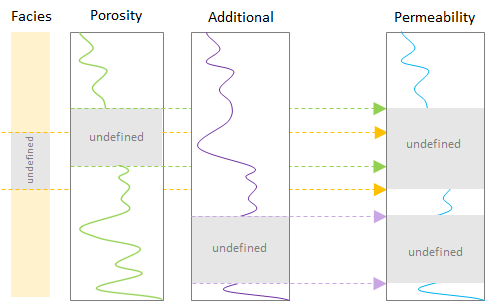
An example showing intervals of undefined property values that are merged in the resulting property. click to enlarge