Refining tri-meshes
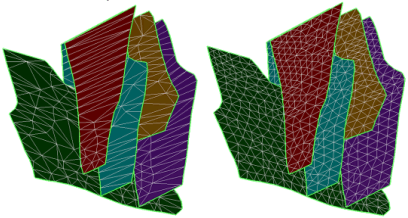
Unrefined (left) versus refined (right) triangles click to enlarge
Use the Refine tool (prepare > Post-Processing Tools > Tri-mesh Tools > Smoothing > Refine) to refine your selected tri-meshes based on a specified triangle size. The refinement algorithm uses the minimum curvature algorithm to smooth the tri-mesh. Other smoothing options, including reducing nodes and smoothing surfaces, are also available.
 To refine tri-meshes
- Select the model.
- Select the tri-meshes to refine.
- For Triangle size, set the average triangle size of the triangles after refinement.
- To restrict refinement to specific, curved areas, specify a value for Minimal curvature. Only areas with a curvature ≥ minimal curvature value are refined. This step is required for geomechanical modeling.
- Click OK or Apply to refine the tri-mesh(es).