Extending tri-meshes to other tri-meshes
Use the Extend to Other Surfaces tool to extend the tri-meshes to other tri-meshes within a specified extension distance. To view various geometrical properties of the triangles, you can display the mesh quality.
At the top of the form, from the Model drop-down list, select the source/model containing the tri-meshes you want to extend.
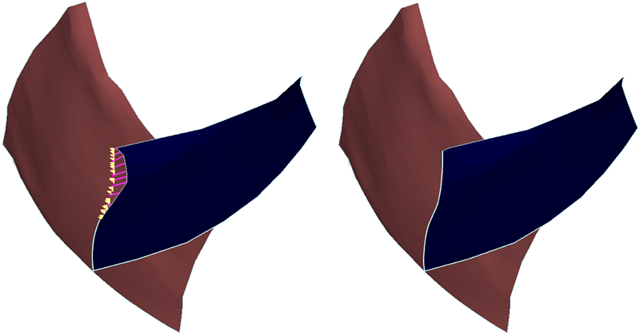
Extending a tri-mesh: Before (with preview) and after extension click to enlarge
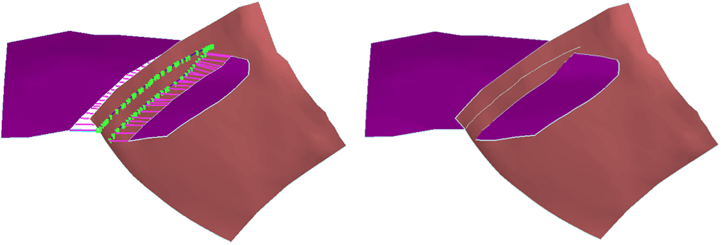
Another example of extending a tri-mesh: Before (with preview) and after extension click to enlarge
 Objects tab
-
Select the tri-meshes that are available for extension:
Fault network When this option is selected, you can extend only the fault tri-meshes. When you check the Include intersections with unconformities option (see below), unconformities, if any, also appear in the tri-mesh list.
Horizon-faults When using this tool within the Faults modeling strip, no surfaces will be displayed as only elements contained in the selected fault model are permitted.
Horizon-horizon When using this tool within the Faults modeling strip, no surfaces will be displayed as only elements contained in the selected fault model are permitted.
Include intersections with unconformities When this checkbox is checked, you can extend intersections with unconformities, irrespective of the workflow stage selected. Check this option to allow the faults of the fault model to be extended to an unconformity or intrusion.
If this checkbox is unchecked, unconformities are not treated in the Structure Builder.
- From the list of available tri-meshes, select the tri-meshes for which you want to extend by clicking the individual check boxes or right-click the list and make a selection from the context menu.
- To individually specify the search radius for finding extension areas, click in the Distance box and change the value.
-
If you want to apply the extension distance to a selection of tri-meshes, first select the tri-meshes in the table, then check the 'Modify selection only' option. Clicking All will apply the extension to the selected tri-meshes, clicking Clip smaller will apply the extension to all tri-meshes which are selected in the list and have an extension distance smaller than the given value. Clicking Clip larger will apply the extension to all tri-meshes which are selected in the list and have an extension distance larger than the given value.
-
To override the individual tri-mesh extension distances, and enter your own global extension distance, check the Override tri-mesh extension distance, and then for Extension distance, enter the extension distance.
To clean or edit the tri-meshes before the extension, use the prepare > Post-Processing Tools > Tri-mesh Tools or Tools > Editing Tools.To display the extensions in the 3D View, click Preview.
-
To automatically display the extensions in the 3D View whenever a new tri-mesh is added to the selection or when the extension distance is modified for one of the tri-meshes, check Perform preview automatically.
-
To extend all identified tri-meshes, on the Extend tab, leave the Select extension combinations option unchecked, and then click OK or Apply.
-
To extend selected combinations, on the Extend tab, select the Select extension combinations option.
A list with all identified extension combinations is displayed. Use the arrows to move through the list and show the combinations one after the other in the 3D view.
- To select the combinations to extend, click the individual check boxes or right-click the list to make a selection from the context menu.
-
To temporarily exclude combinations from the extension process, right-click the extension combination and select Discard.
The discarded combinations are de-activated and appear in the Discarded intersection lines list. You can achieve the same effect by unchecking the extension combination, but with the Discard option you can clean up the list for a cleaner view when there are many combinations. You can re-activate the discarded extension combinations from the Discarded extension combinations list.
- To update the 3D View to show the extension combinations, click Show selected items.
- Click OK or Apply to apply the extension to the selected tri-meshes.
- To bring back the discarded extension combinations to the list of extension combinations, click Activate discarded intersection lines.