Creating zone logs
When you have completed your stratigraphic model you can use the Create Zone Log tool (prepare > Stratigraphy > Create Zone Log) to create an interval log based on the markers of your stratigraphic model. Zone log creation does not need any previous model action to be carried out first (such as correlation or grid generation).
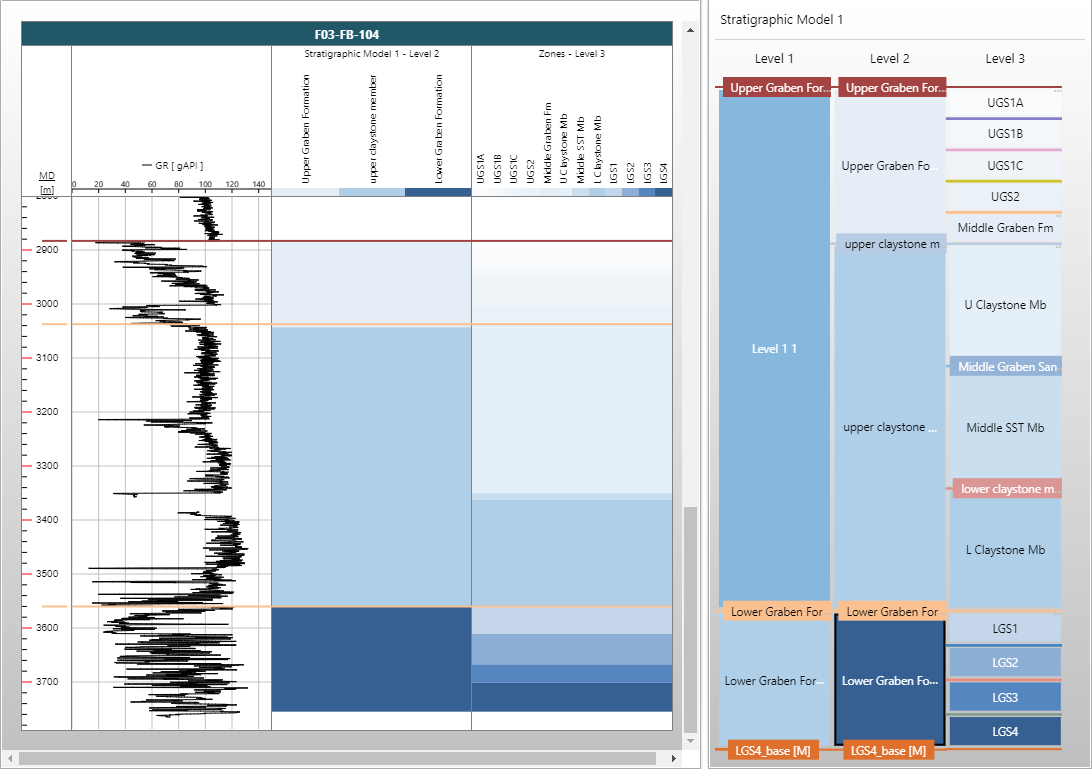
Displaying a zone log in the Well View click to enlarge
To create a zone log with the Create Zone Log form
- Select the stratigraphic model and marker set of interest.
- Select the stratigraphic level for which you want to create zone logs.
- Click Apply to create the logs and keep the form open for additional log creation, or click OK to create the logs and close the form. Zone logs will appear in the JewelExplorer under the Well Data > All Logs > Zone item.
Zone log naming
Zone logs are named using the associated stratigraphic model and hierarchy level. For example, a zone log created for the model 'Strat 1' and the 'Level 3' stratigraphic level will be named 'Strat 1 - Level 3'.
Faulted wells, deviated wells and missing markers
- Where a marker is missing, no zone log can be created.
- For a faulted well interval in deviated wells, no zone is created.
- In deviated wells a zone log can be created, but vertical thickness is not calculated.
- If a fault marker is missing in a faulted well, a zone log is created as if the fault did not exist. Its presence is not detected.
- If a fault intersects a well and a horizon marker is missing, no zone log for intervals above and below fault is created if the thickness of the intervals above the fault and below the fault is larger than average thickness.
- If a fault intersects a zone interval and the thickness above and below the fault < average, a zone log is created.
- If a deviated or horizontal well re-enters a zone and intersects it twice or more times, a zone log is created, but the Thickness Table shows only one depth.