Deriving marker names from the stratigraphy
After creating a marker set, you can choose to generate marker names ('empty' markers, e.g. markers without a data representation yet) for the marker set based on a stratigraphic model. This functionality is contained in the Markers from Stratigraphy form (prepare > Wells > Markers from Stratigraphy) and is used primarily when planning to manually pick markers in the Well View, as picking can begin once the marker names are generated. When using this form, you specify a stratigraphic level from which the marker names will be generated, along with a naming convention for the markers. The resulting marker names appear in the JewelExplorer under the Well Data > Marker Sets item and are sorted stratigraphically.
To derive marker names from the stratigraphy
- Select the marker set that you want to generate marker names for.
- Specify the stratigraphic model and stratigraphic level from which the marker names will be generated.
-
The markers can be named after the top or base events assigned to the model, if available. If no top or base event has been specified, the markers will take the name 'Top' if Top is selected, or 'Base' if Base is selected. In these circumstances, the stratigraphically shallowest event will always have 'Top' appended to its name, while the deepest event will always have 'Base' appended, despite the naming selection in the form. For example, in the image below, Base was selected as the naming reference, and 'Base' was appended to the name of all but the shallowest event in the set, Horizon 1, which became Horizon 1_Top to indicate its position as the top event in the model. If Top had been selected as the naming reference, the result would have been four markers with 'Top' and the deepest event, Horizon 4, would have received 'Base' as part of its name.
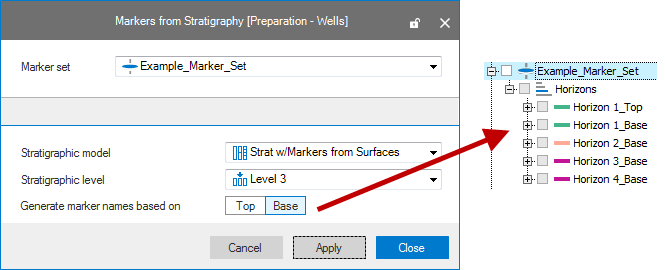
The Markers from Stratigraphy form click to enlarge
- Click OK to create the marker names and close the form. Otherwise, click Apply to create the marker names and keep the form open for further work. In either case, the 'empty' markers are created and are available in the JewelExplorer under the Well Data > Marker Sets item. These markers are named after the events in the stratigraphic model and are available in the JewelExplorer, sorted stratigraphically. Well picking using these markers can begin immediately using the Editing Tools and the Well View. For more information, see Working with markers in a Well View.