2D Trend
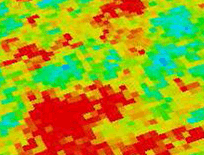
A 2D grid property map click to enlarge
The 2D trend transformation allows you to eliminate the effect of lateral directional trends from the data before simulation. A 2D directional trend can, for instance, be derived from seismic data as a 2D seismic attribute map. Internally, 2D trend data are automatically converted into a 3D trend property. To all cells in a specific cell stack, the same trend value is applied.
Simulation after data transformation using a 2D trend is comparable to simulation without data transformation, but using a supporting property as with co-kriging, or similar methods, instead. In both cases the simulated data is ‘steered’ by trend information. However, 2D Data Transformation is a deterministic process, which simply subtracts a fixed trend from raw values and adds it to simulated data again. Methods like co-kriging and co-SGS, on the other hand offer more control through the setting of a correlation coefficient. Therefore, if possible, simulation using a supporting property is the preferred method. In the current application version, however, you can only use 3D properties as a supporting property.
For a deterministic trend to make sense, the units of the 2D trend data must be the same as those of the primary variable that you are simulating. If the trend variable is derived from data in different units to the primary variable, then you must re-scale the trend. You normally do this with a linear least-square fit or piece-wise curve fit.
Parameters
2D Grid Select the input 2D grid.
Trend property Select the property that you want to use to de-trend your data.
Trend line polynom degree You can apply a polynomial degree if your data displays a non-linear relationship.
Trend line This field shows the function of the trend line (polynom). To edit the function, click on the blue pencil icon  . This will open the Edit Trend Line form. To undo any changes you make with the Edit Trend Line form, click the Undo icon
  .
.
Correlation coefficient This field shows the value of the correlation coefficient. As a general rule, correlation must be at least 0.3 to 0.5. If lower, the trend is too weak to be statistically valid
The cross plot at the right-hand side of the form displays the values of all data points versus their projected position on the trend line.
Click Apply or OK to remove the lateral trend from your data before you execute a modeling run for the selected VOI.