Adjusting wellbore symbols using the property inspector
All wellbores have a symbol that you can adjust using the Property Inspector. The symbol indicates well type, technical status, fluid type and hydrocarbon status. If this information is unknown, the symbol used will be a question mark. The well symbols used are based on the Shell Standard Legend 2016. For a complete overview of all the well symbols, see Well Symbols Legend.
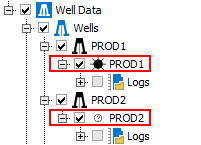
When a well symbol is not set, it will be a question mark by default. click to enlarge
Adjusting the wellbore symbol
- Select a wellbore in the JewelExplorer.
- Open the Inspector (Ctrl+F3).
- Scroll down to the Wellbore section.
- From the drop-down list, select the symbol that suits the current status of the wellbore.
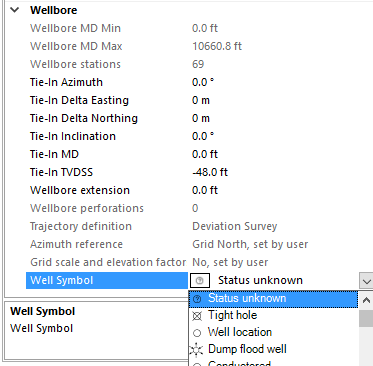
Change the well symbol via the Inspector click to enlarge
You can assign the same well symbol to multiple wellbores at once. First select the wellbores in the JewelExplorer and then select a well symbol via the Inspector.