Controlling object visibility on cross sections (in the 3D View and Cross Section View)
The possibility to project objects (e.g. wellbores) and/or surface intersections onto cross sections is managed using a special state of the JewelExplorer. To visualize these in a Cross Section View or on a cross section in the 3D View, you need to actively switch between the normal and cross sections state.
You can switch between states using the context menu of cross section objects (Object visibility control) or by double-clicking on a cross section object in your 3D View.
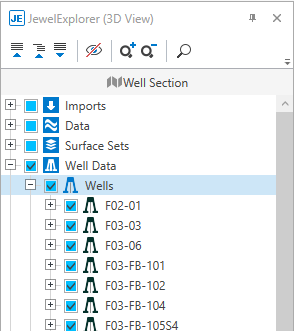
The JewelExplorer in 'Cross Section state', recognizable by the name (in this case 'Pane Section') at the top of the pane. click to enlarge
Recognizing the active state of the JewelExplorer
You can recognize the active state of the JewelExplorer as follows:
- At the top of the JewelExplorer it will state the name of the plane section / vertical section / surface-parallel section.
- The check boxes in the JewelExplorer have different background colors:
- white - normal state.
- light blue - selectable in Cross Section state. In the Cross Section state, some boxes will be disabled (light gray) to indicate that this choice is not supported.
You can visualize your cross section in the 3D View, or in a dedicated Cross Section View.
- When viewing your cross section in the 3D View, all objects that were visible during creation of the cross section, will be displayed on the canvas by default. To control which objects are displayed on your canvas in the 3D View, you have to change the state of the JewelExplorer to Cross Section state.
- When viewing your cross section in a dedicated Cross Section view, initially all objects that were visible during creation of the cross section, will be displayed. You can use the JewelExplorer, which is by default in Cross Section state, to control which objects are projected.
Visibility and display settings for the cross sections in 3D Views and in Cross Section Views are, however, controlled individually and will not remain synchronized.
The location of a cross section object is unique and, if changed, will be updated in all views that show it.

 Example on displaying cross-section area in the 3D View