Creating and editing well events
You can create a new well event, or edit the details of an existing well event, for a wellbore in the Well Event Table (Views > Well Event Table). Optionally, use the context menu of the wellbore in the JewelExplorer,
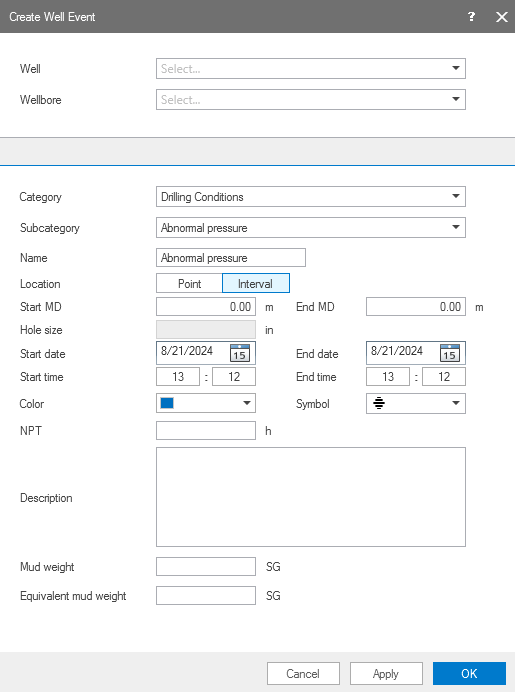
An example of a well event recording abnormal pressure while drilling. click to enlarge

- Select a Well from the drop-down list.
- Select a Wellbore from the drop-down list. If you are creating a well event using the context menu of the wellbore, this wellbore is already selected.
- Select a Category of the well event from the drop-down list :
- Select the Subcategory of well event from the drop-down list. For every well event type, a default selection of location, color and symbol is made after you select the subcategory of well event. If no subcategory is suitable, you can select Other.
-
A default Name is provided along with the subcategory. You have the possibility to change the name if necessary.
-
Select a Location type, i.e. point or interval. If you select a Point location, you must enter the depth value in measured depth (MD). If you select an Interval location, you must enter a range of measured depth for the well event in Start MD and End MD. To change the units for depth, right click on the units next to the depth entry and select the units.
-
Select the Hole Size displayed from the Well Schematics. If the well event relates to more than one hole size,the largest hole size is displayed.
-
Enter the Start Date and End Date as calendar format when the well event is observed or recorded. Note that you cannot set a Date in the future for a well event.
-
Enter the Start Time and End Time (in 24 hour format) when the well event is observed or recorded in the wellbore. Note that you cannot set a time in the future for a well event.
- You can change the default Color of the well event by selecting it from the drop-down. Default colors (blue, orange and red) are based on the 'type' selected under step 3, and indicate the severity or importance of the event type.
- Blue indicates an informative well event type to record an observation or a status.
- Orange indicates a caution or interference during the drilling activity.
- Red indicates a major obstacle, tool failure or poor data records.
- Green indicates a good run without issues or concerns.
- By default, a Symbol is assigned to every well event type. The default symbols for the well event types in JewelSuite are designed to accurately symbolize the definition of the well event types. You can change the default symbol from the drop-down list.
- Enter the numerical duration in hours for the NPT, the Non-productive time.
-
Add a Description for the well event in the adjacent field.
A warning appears if no description is entered for a well event. To interpret the context of indicating a well event, it is recommended to enter a description.
- Enter the observed Mud Weight and the Equivalent Mud Weight (EMW) in the wellbore when the well event is recorded. Right click on the units to change the units of the mud weight. For certain well event types, these input option are not available. Mud Weight can either be left empty, or should be greater than or equal to 0.
- Click Apply to save the well event and Close the form. The well event is listed in the Well Event Table and is also shown in the JewelExplorer under the respective wellbore > Well Events item. To make a copy of the current well event type for another wellbore, change the wellbore and other inputs without closing the form.
- In the Well Event Table, select the well event that you want to modify and click on the edit well event icon
 .
. - For the selected well event, you can modify all fields in the table, except the hole size in the editing form.
- Click Apply to save the changes and Close the form. You can continue to edit other well events without closing the form, by selecting the well event in the Well Event Table.
- In the Well Event Table, select the well events that you want to modify and click on the edit multiple well events icon
 .
. - You can modify all fields of the well event table, except the hole size in the editing form if applicable.
- Click Apply to save the changes and Close the form. You can continue to edit other well events without closing the form, by selecting the well event in the Well Event Table.
- Make sure your active view supports the display of well events, i.e. the 2D View, 3D View or Cross Section View.
- First, make sure the wellbore of interest is displayed in the view.
- In the JewelExplorer, select the well event(s) that you want to visualize in the view. All the well events are listed under the Well Events folder under the well. The well events are sorted by depth (MD).
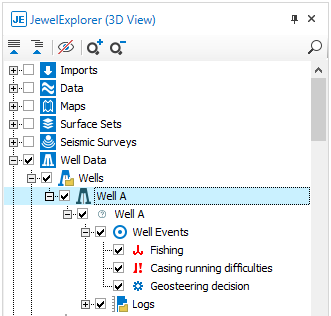
Well events listed in the JewelExplorer, and selected for display in the 3D View. click to enlarge