Edit mapping intervals
To do proper projection mapping from the source wellbore to the target wellbore, the target and the source wellbore need to have specified intervals. All the horizon markers in your marker set that appear in the target wellbore are used to create the default mapping intervals listed on the form. Then, for the source wellbores, the same amount of intervals is created based on the markers available in the source wellbore(s). The top and base of the intervals for your target wellbore and the source wellbore do not have to match.
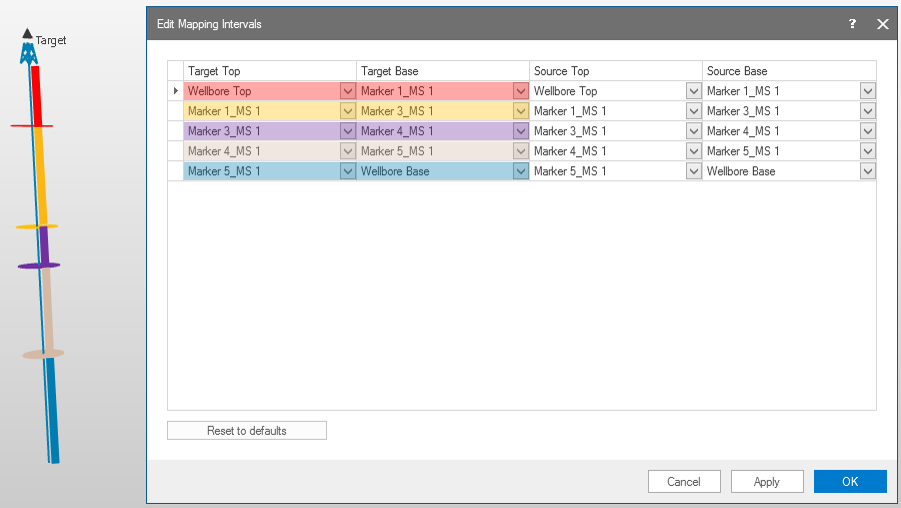
Mapping intervals are based on the available horizon markers in the target well. click to enlarge
You can manually change the listed intervals using the markers in the drop-down lists. In the drop-down list, all available markers (horizon, fault, fluid level, unconformity, etc) in the marker set are listed. You can remove and add rows using the context menu. Upon clicking Apply, the intervals are validated: for the target wellbore you are not allowed to have overlapping intervals, you must use markers in the correct MD sequence, and you cannot select one marker to be the top and the base of an interval.
A top or base of an interval is set to undefined when a marker is not available in all the source wells. For these intervals, the pseudolog is not calculated, but null values/unknown classes are used instead.
Once you are done setting up your mapping intervals, click OK to close the form and return to the Pseudolog from Wells form.