How 'Autofill Fluid Levels' works
The Autofill Fluid Levels button populates the table on the Fluid Levels form with the Fluid Leg, GOC and FWL information per compartment. This information is based on the aggregated fluid log data and is implemented as follows:
| Data Present in Fluid Log | Fluid Leg | Compartment GOC | Compartment FWL |
| No oil/gas/water seen | None | ||
| Only gas seen | Gas | The deepest gas | |
| Only oil seen | Oil | The deepest oil | |
| Gas and oil seen | Gas and Oil | The deepest gas |
The deepest oil |
|
Only water seen |
Water only |
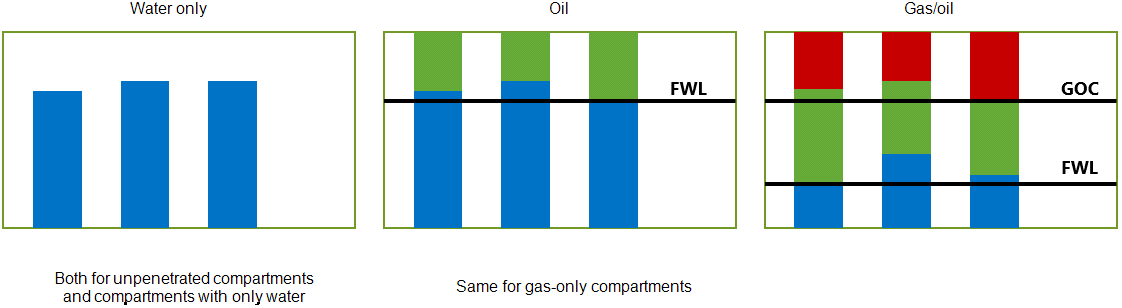
Schematic visualization of the autofill rules as explained in the table above. click to enlarge
When the fluid logs are combined with net rock logs, net rock logs act as a filter on the fluid logs, i.e. fluid logs that correspond to non-net intervals are simply ignored. The 'Autofill Fluid Levels' button populates the table by taking into account only the 'net' intervals.
As an example, see the image below with explanations. The 'Fluid logs' image on the left indicates gas, oil and water as fluid type with red, green and blue colors respectively. The 'Fluid logs combined with net rock logs' image on the right indicates 'net' and 'non-net' intervals with yellow and brown colors respectively.
- The compartment GOC which is the deepest gas (GDT) obtained from fluid logs corresponds to a 'non-net' interval. Therefore, GOC is moved to the deepest gas which is observed within a 'net' interval.
- The compartment FWL which is the deepest oil (ODT) obtained from fluid logs corresponds to a 'non-net' interval. Therefore, FWL is moved to the deepest oil which is observed within a 'net' interval.
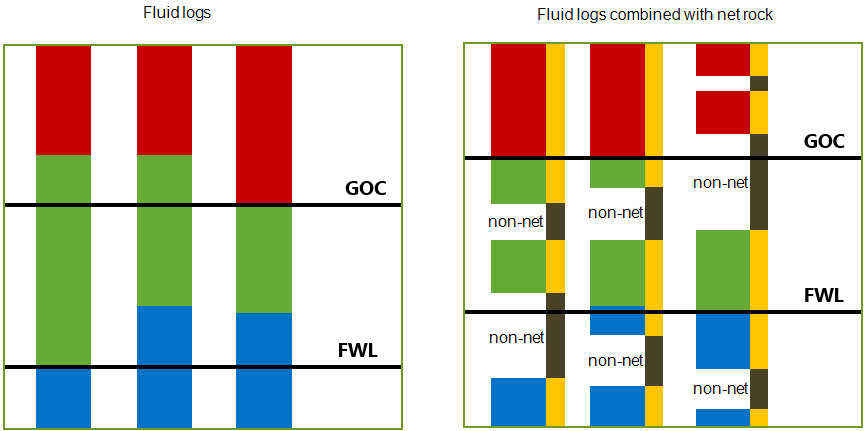
Left: The fluid logs for this case are inconsistent. Right: The same case but now with net rock logs included (yellow indicates net, brown indicates non-net intervals). Due to the net rock log, the autofilled information for GOC and FWL have changed. click to enlarge