Fluid leg definitions and volume calculations
On the Assign Data form (model > Volumetrics), you can either assign a fluid model and a saturation model, assign only a fluid model, or choose not to assign any of them. These selections are important as they have implications on the following:
- Fluid leg definition
- Gross rock volume (GRV) calculation
- Hydrocarbon pore volume (HCPV) calculation
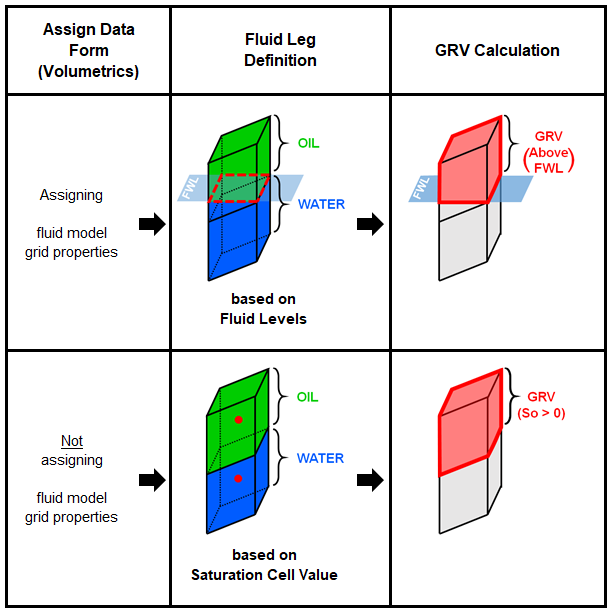
The fluid leg definition and GRV calculation method are determined by whether you have assigned a fluid model to your volumetrics case, on the Assign Data form (model > Volumetrics). click to enlarge
The fluid leg definition is significant for the gross rock volume calculation. JewelSuite has two methods to define the fluid legs. The method is determined by whether you have assigned a fluid model to your volumetrics case on the Assign Data form:
- Fluid levels Fluid leg definitions honor the exact depth of the fluid levels, splitting the grid cells that intersect the fluid levels.
- Saturation cell value Fluid leg definitions honor the saturation values of the grid cells. Cells with So > 0 are allocated to the oil leg. Cells with Sg > 0 and So = 0 are allocated to the gas leg. Finally, cells with Sw = 1 are allocated to the water leg.
JewelSuite has two methods to calculate hydrocarbon pore volume. The method is determined by whether you have assigned a saturation model to your volumetric case on the Assign Data form:
- When you assign a saturation model, the hydrocarbon pore volume is calculated based on the bulk volume. This is because the 'Cell average' methods used in the Saturation Modeling workflow calculate saturations in grid cells below the free water level.
- When you do not assign a saturation model, the hydrocarbon pore volume is calculated based on the gross rock volume.