How to build a stratigraphic model
The construction of a stratigraphic model can be an iterative process, where a priori knowledge of the area’s stratigraphy is updated and refined during the process of data interpretation. A priori, often high-level stratigraphic knowledge of the area can already be placed in the stratigraphic model, which can guide horizon and marker interpretations. Inversely, more detailed knowledge coming from horizon and marker interpretations can immediately be placed into context of the area’s broader stratigraphic hierarchy. This way the stratigraphic model can evolve as more data becomes available. Also, the stratigraphic model combines and orders the interpretations produced by the various disciplines, which typically varies between laterally extensive interpretations produced during seismic interpretation, and local horizon interpretations based on well log correlation, which might highlight omissions at an early stage. Stratigraphic connectivity can also be established by fluid contact differences or post-production reservoir pressure depletion.
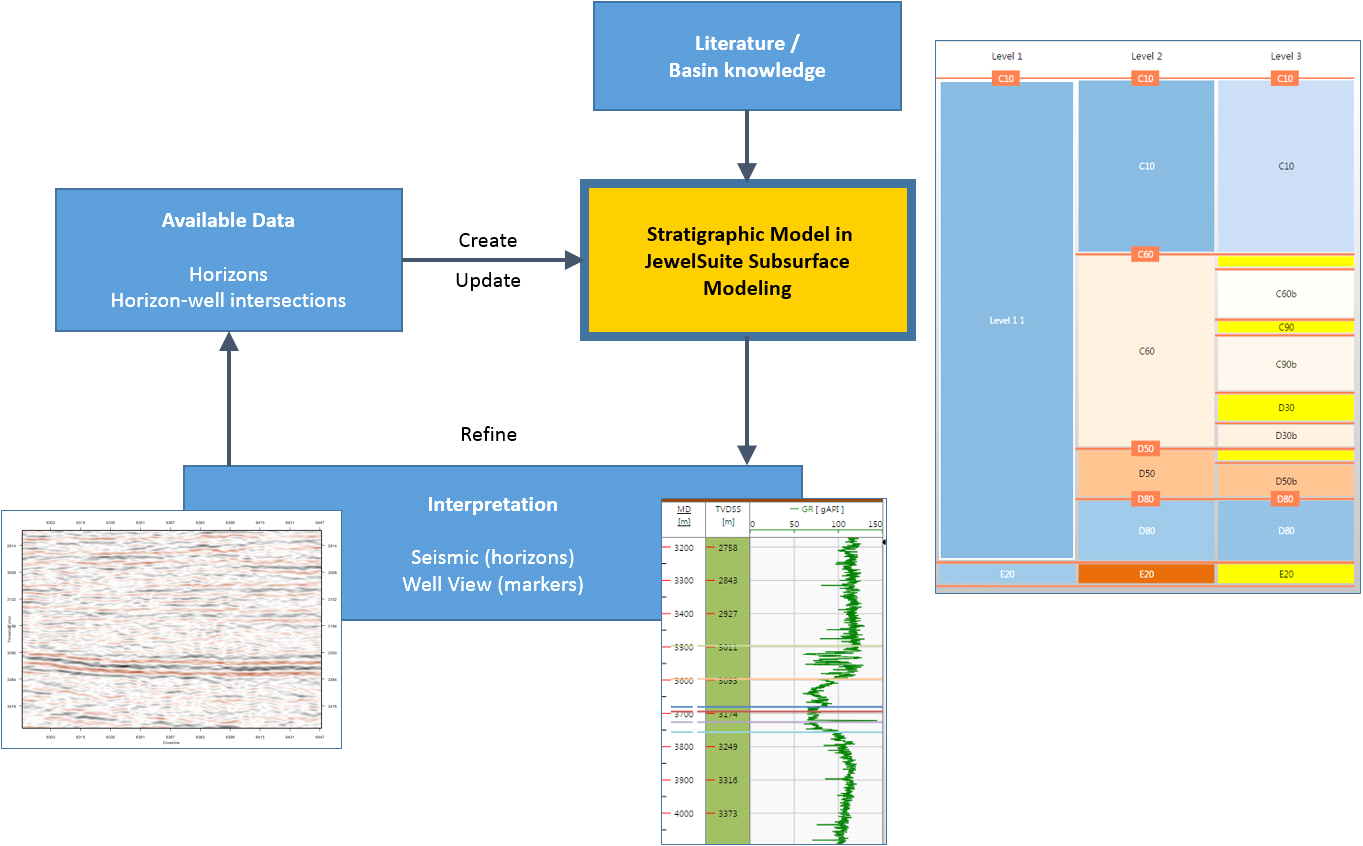
Flow diagram showing how the stratigraphic model interacts with the data available. This diagram is limited to static data but other data (such as fluid contacts, depletion, interference tests) also provide an input to the stratigraphic correlation click to enlarge
Events and their underlying data representations
JewelSuite Subsurface Modeling makes use of the term event to describe a boundary. This can be a stratigraphic boundary (e.g. a horizon or unconformity), a structural boundary (e.g. a fault) or 'another type' of boundary (e.g. a fluid contact or mesh boundary). Each event can contain one or more geometric representations, where a geometric representation refers to the underlying data that defines the event. The application supports five types of geometric representations: tri-mesh, 2D grid, polyline set, point set and marker.
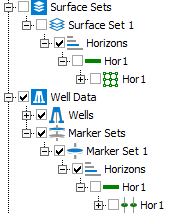
Detail of the JewelExplorer, showing an event ('Hor 1') with two data representations: a 2D grid ( ) located in Surface Set 1 and a marker (
 ) located in Marker Set 1 click to enlarge
It is important to realize that you assign events, not the underlying data, to the zone boundaries in the stratigraphic model.
Of all possible events, only ones with stratigraphic significance can be assigned to a stratigraphic model:
- Horizons
- Unconformities
- Intrusions
The ability to assign events and to have multiple geometric representations of the same event, has two important advantages:
- Interpretations done by various disciplines come together in one stratigraphic model (for example ‘Event A’ can be represented by a 2D grid produced during seismic interpretation and a marker set produced during well correlation).
- When you want to build multiple 3D structural models based on alternative interpretations of the same event(s), you only have to set up the stratigraphic model once. Only the data source (e.g. the surface sets or seismic interpretations that store these alternative interpretations) varies between these alternative 3D structural models.
With events having the ability to be represented by various geometric representations and to be existent in multiple models, there are strict rules to their use (for details, see Geological events in the modeling workflow).
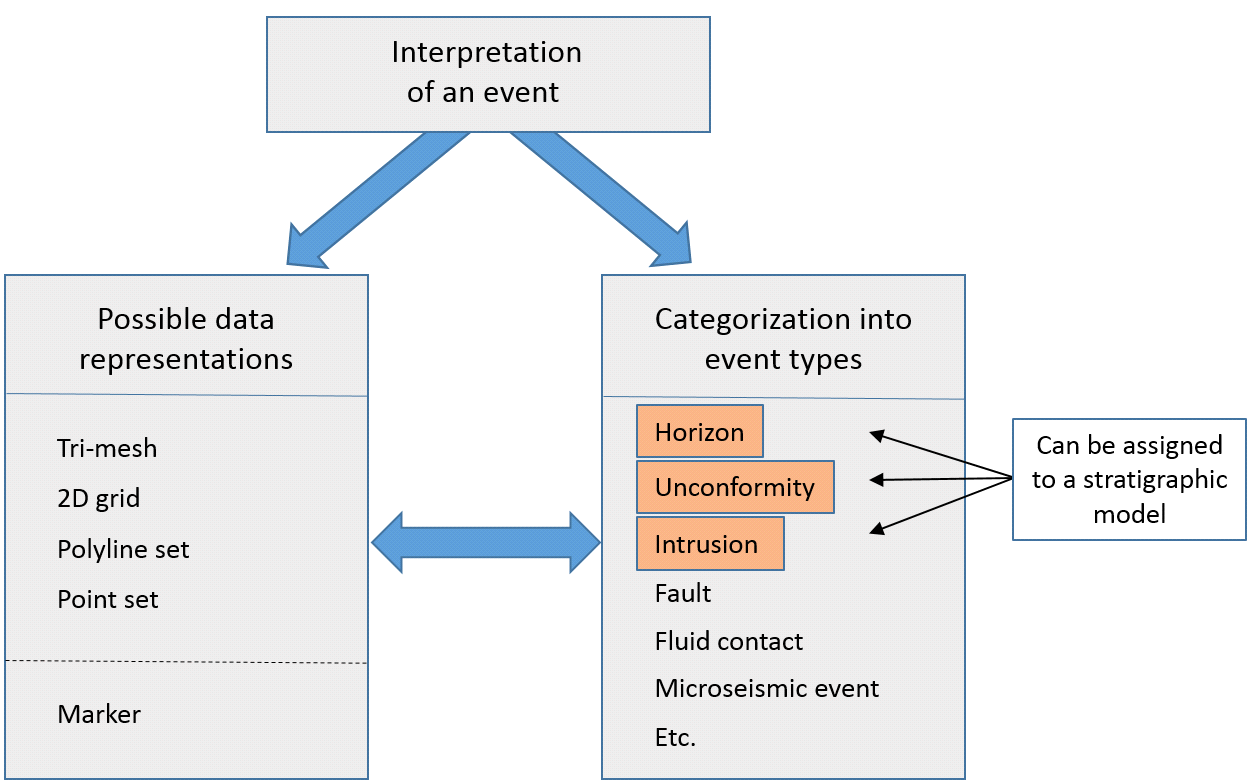
There are many types of events. Of all event types available, only types with stratigraphic significance (orange in the image) can be assigned to a stratigraphic model. Each event type can be represented by multiple data representations. click to enlarge
On most occasions, when interpreting data in JewelSuite Subsurface Modeling, the event type is set automatically as the ‘type’ is an integral part of the creation of a new interpretation. For example, when starting a new well correlation or seismic interpretation, upon creating the newly interpreted ‘object’ you are obliged to select the event type upfront (for example ‘horizon’, ‘inflection point’, ‘unconformity’, etc.). You can, however, always change the event type in the Property Inspector but only when that event has not yet been assigned to the stratigraphic model. For that reason it is important that the event types are properly set before proceeding with the modeling workflows.
Building the stratigraphic model
When first creating a stratigraphic model, there are three main sources which can be used to define the zones and zone boundaries:
- Interpreted surfaces (grouped in either a ‘Surface Set folder' or ‘Seismic interpretation folder'; see preparing surfaces for more on this)
- Well log interpretations (grouped in a ‘Marker Set’)
- A priori knowledge of the model area stratigraphy (in the form of zone names, for example ‘Upper Ness Formation’)
The source chosen defines how the stratigraphic model is constructed:
- You create the stratigraphic model based on interpreted events (bullet points 1 and 2 above). As a next step you choose at which stratigraphic level you want to place these events. When creating the stratigraphic model in this way, the events and the zone boundaries are automatically linked. You would typically choose this option when you already have a substantial set of events in your solution, for example because you imported them, or when you started off the interpretation without the need for a stratigraphic framework yet.
- You create the stratigraphic model based on a priori knowledge (bullet point 3 above) and do not (yet) want to relate it to any interpreted event, which means you manually type the names of the zones that you envision to incorporate in the 3D geological model. You can manually create these zones at the stratigraphic level(s) of your choice. This way you manually construct the stratigraphic framework and will assign events to the zone boundaries afterward.
A stratigraphic model can be used iteratively throughout the modeling life cycle and the resolution will depend on the aim of the modeling. For example, in exploration or greenfield settings, you would create a first order stratigraphic model based on seismic-to-well ties, then infill and update the first order model based on regional flooding surfaces and/or high level marker sets, and finally add more detail to the model based on detailed well correlation.