Model Definition view
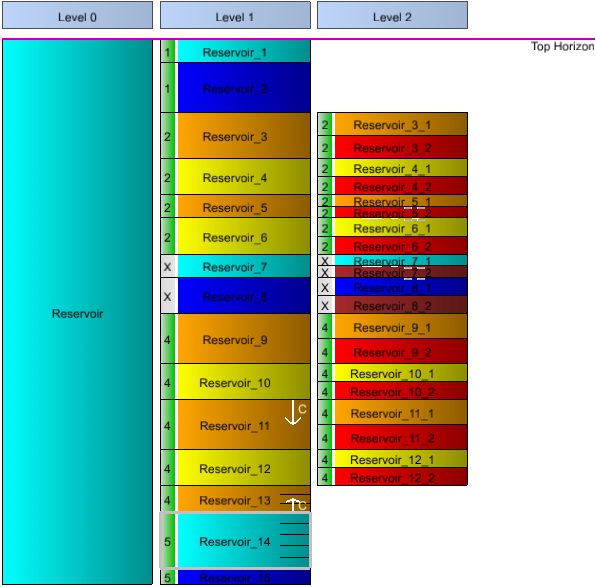
A Model Definition view click to enlarge
The Model Definition view can be used to interactively define all the layers and sub-layers in your model which will form the upper and lower boundaries of the grid layers during the gridding and, later, upscaling processes. The view can be opened and modified from the Upscaling & Layers form in the Grid from Grid button group in the model > 3D Grid substrip.
The Model Definition context menu is available when right clicking on a specific model layer in the Model Definition view. The context menu can be used to add, delete, split, and group layers, among other actions described below. Depending on the selected 3D grid, the following options can be available:
Split the selected model layer(s) Splits the selected layer into two.
Split layer on deeper level Creates a chosen number of child layers in the selected layer.
Insert layer above Creates layer above in the same level.
Insert layer below Creates layer below in the same level.
Insert child layer above Creates a child layer in the level to the right (if you have multiple child layers, this option allows you to insert a child layer above other child layers).
Insert child layer below Creates a child layer in the level to the right (if you have multiple child layers, this option allows you to insert a child layer below other child layers).
Set internal layers Creates internal layers within a layer.
Group Layer Choose one or more layers to create a sub-group to be used as reservoir simulation layer.
Ungroup layer Choose one or more reservoirs that have been assigned to a sub-group to ungroup (reset the grouping).
Impenetrable Defines the selected layers layer as impenetrable.
Penetrable Defines the selected layers layer as penetrable.
Demote layer Adds a copy of the selected layer to a deeper level and also moves its children to deeper levels.
Promote layer Moves the active layer up to the parent level by splitting the parent.
Promote top surface Splits the parent level in two and couples the top surface in between these layers.
Promote base surface Splits the parent level in two and couples the base surface in between.
Merge layers The selected model layers will be merged into a single model layer.
Delete layers and keep children Deletes the selected layers from the Model Definition view while keeping their children.
Delete layer Deletes the selected layers from the Model Definition view.