Summarize
The functions of this category calculate a single value using a whole property specified as its parameter. Besides the property name, any expression can be used. In this case, a temporary property is created in accordance with a typed expression, and this property will be used as a function parameter.
Only those values of the property are used for calculation, which produce a true result for logical expression. Parameter logical expression is not obligatory. If it is absent, then all property values are used.
EXAMPLE: Expression psum($Cell Volume$,$LayerId$== 1) gives the volume of layer with identification equal to 1. Expression psum($Cell Volume$) gives the volume of the whole grid.
Summarized functions can also be used with several properties. For example, expression pmean($Property1$, $Property2$, …, logical expression) gives the mean value for several properties, but in this case the parameter logical expression is obligatory.
Example 56 Property scale. Example to scale a property between interval [0, 1]
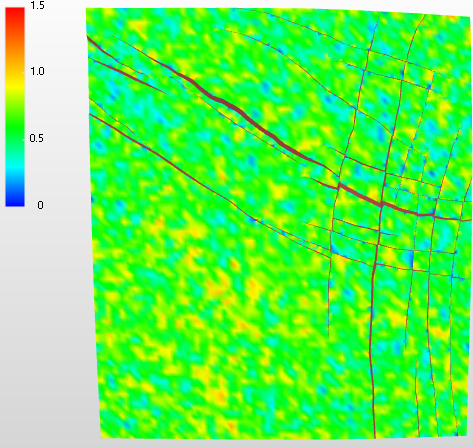
Original click to enlarge
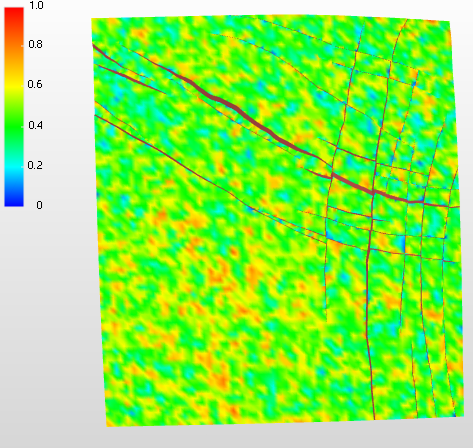
($M2$ - pmin($M2$ ))/ (pmax($M2$ ) - pmin($M2$ )) click to enlarge
Example 57 Calculate volume of corresponding layer
psum( $Cell Volume$ , $LayerId$ = 15)
Example 58 Calculate area within polygon
Use psum to calculate the area within a polygon. To do this:
- Unclose the polygon with the 'Close/Unclose Polyline' option of the Workspace > Tools > Editing tools > Polyline Set Tools
- Triangulate the (now open) polygon with the prepare > Surface > Triangulate form (if the polygon was set to type 'boundary', set it so type 'fault' in order to make it selectable on the Triangulate form)
- Create a property of type 'Area' for this tri-mesh with expression psum(ProjectionArea) (see image below).
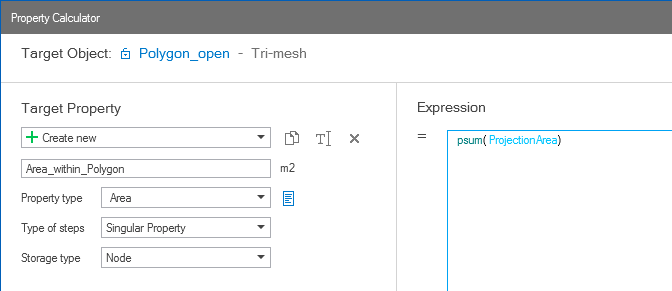
The psum function applied to the triangulated polygon, resulting in property 'Area'. click to enlarge