Interpretation QC of fault-fault intersections
It is recommended to QC your fault interpretations as early as possible in the modeling process in JewelSuite Subsurface Modeling. Seismic fault interpretation can be seriously hindered by data quality, especially where faults intersect. By creating a surface-parallel section based on a fault tri-mesh, and subsequently displaying a seismic attribute on the fault plane ('draping the fault') you can validate the fault interpretation along the full length of the fault-fault intersection. When moving the surface-parallel section sideways, seismic data is automatically updated, enabling you to perform seismic QC of the greater area around the fault intersection.
To do this:
- Make sure the faults you want to QC have a tri-mesh representation. You may want to visualize them in the 3D View but this is not necessary. If you are preforming this QC step early in the modeling process, i.e. at the end of the Seismic Interpretation workflow) you can triangulate your faults by checking the Create QC Tri-mesh box on the Triangulation Settings form (prepare > Seismic > Triangulation Settings).
- In the JewelExplorer, under the Seismic Volumes folder, check the box of (select) your Seismic Attribute (Properties > Seismic Attribute). It is important that you have it selected at the moment of creating the Surface-parallel Section, else, you cannot drape it with the seismic attribute.
- Create a surface-parallel section of the fault on which you want to QC the intersection with the other fault (i.e. of the fault that you want to drape with the seismic attribute). There are two ways:
- With the Cross Sections form (choose Open cross section form under the cross section icon
 in the 3D View toolbar), subsequently select Surface-parallel section and the relevant fault under Tri-meshes, then click Create.
 - With the Context Menu of the fault: right-click on the tri-mesh of the relevant fault and select Create > Create Surface-parallel Section.
- With the Cross Sections form (choose Open cross section form under the cross section icon
- Visualize the other fault for which you want to validate the intersection by checking the box in the JewelExplorer.
- Move the surface-parallel section sideways to QC the 1) interpreted intersecting fault plane and 2) the interpreted draped fault plane. Note that you are not moving the actual fault, only the surface-parallel section with the draped seismic attribute. For how to move a surface-parallel section, see section 'Moving a cross section with the help of 3D cursor' in Moving, rotating and adjusting cross sections with the 3D cursor.
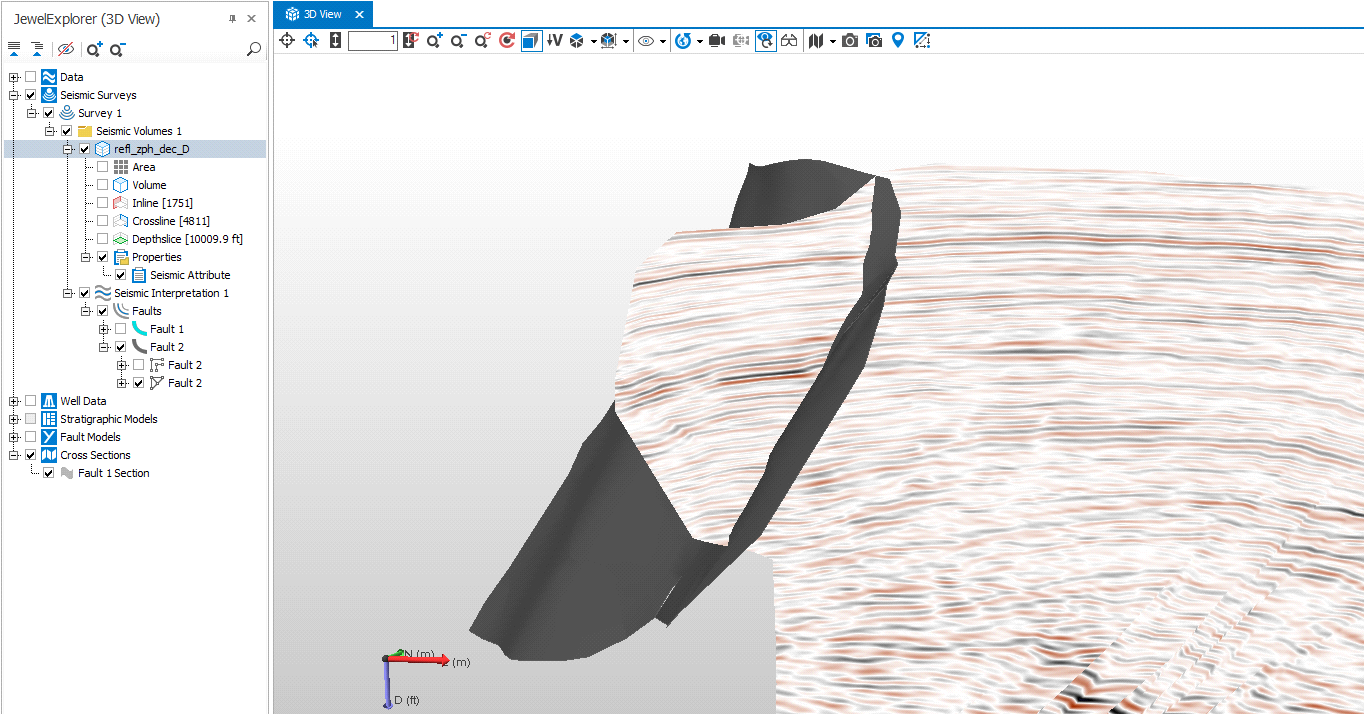
Interpretation QC of a fault-fault intersection. The surface-parallel section, which is draped with the seismic attribute, intersects with another fault (in brown) click to enlarge