Time domain versus depth domain – visualization
In principle, time domain and depth domain objects are visualized separately. A depth domain view can only display depth domain objects, a time domain view can only display time domain objects.
The default view in the application is the 3D View, which displays depth domain objects in 3D. You can create a new view by clicking the Views button in the upper right corner of the application and selecting a view from the list, including time or depth views in 2D or 3D. Select 2D View, 3D View or CoView for a new view in the depth domain (the default), or 2D Time View, 3D Time View or CoView for a new view in the time domain.
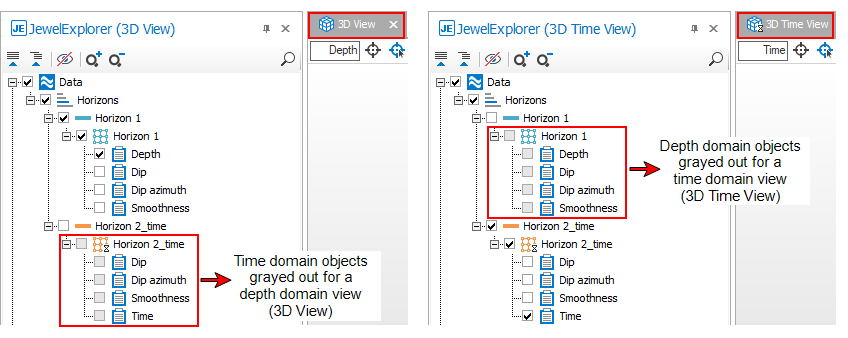
The check boxes of non-selectable objects are grayed out as a visual reminder. click to enlarge
The JewelExplorer is always connected to the active view. When the active view is a depth domain view, you can only select depth domain objects in the JewelExplorer. If your active view is a time domain view, you will only be able to select time domain objects.
Note that the Well View is only in the depth domain, while all other views such as the Production Data view are not domain-specific.