Multiple control nodes on a single fault stick
In some fault systems, the fault model will generate situations in which multiple fault cutoff line control nodes will fall on a single fault stick. An artificial example is shown below. In this case, you will only be able to edit one of these nodes.
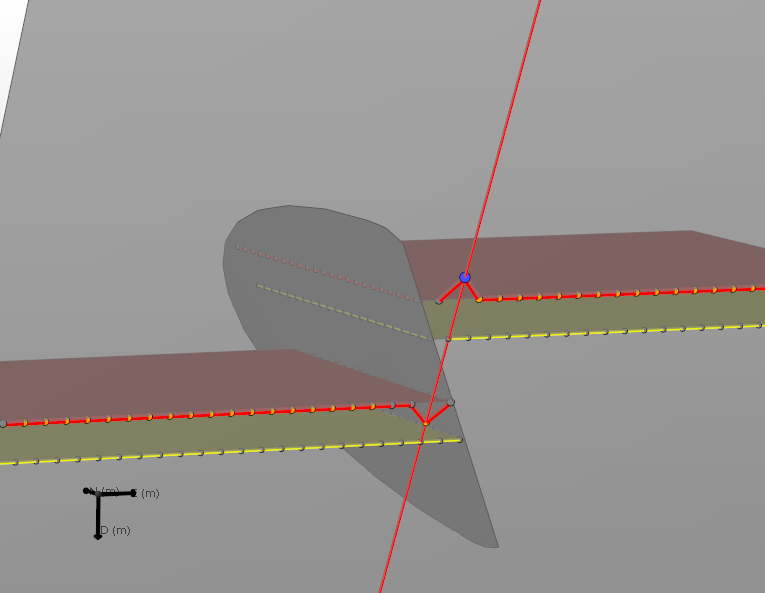
Artificial example in which multiple fault cutoff line control points will fall on the same fault stick. The fault stick lies in the plane of the large gray fault which covers the entire image click to enlarge
Where encountered
- model > 3D Structure > Fault Cutoff Line Edits
Cause
The algorithm currently creates fault sticks and only allows a single edit per wall type (hanging wall and footwall) on a stick. This means that it is not possible for you to achieve both the edits shown above.
How to fix the issue
You will need to decide which edit you prefer. The last edit you make will be honored, and the others ignored. Edits made on fault sticks not holding multiple nodes are fully honored.
Result
If you last changed/edited the bottom node, the final result will reflect only this edit.
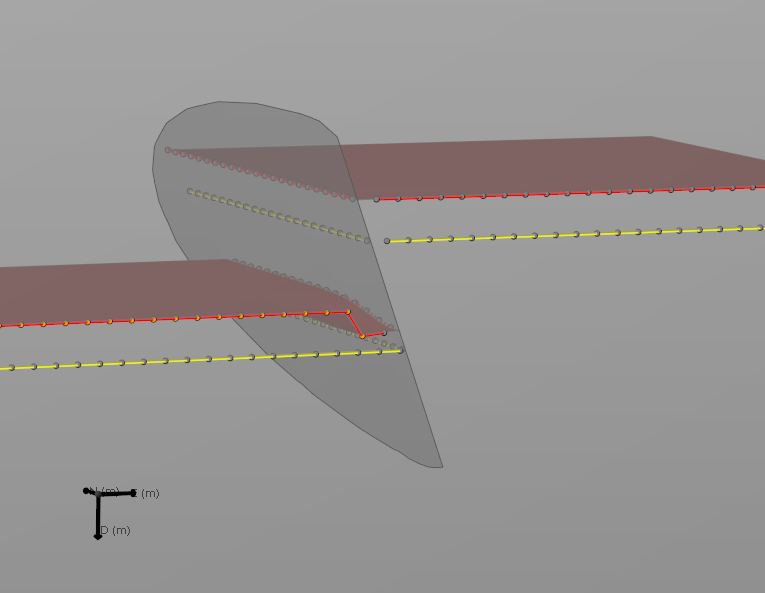
Applying the operation after the final edit on the bottom node will lead to the result shown in the image. The top edit will be ignored click to enlarge