Adding and editing a summation track in the Well View
You control the display of data in the Well View using the JewelExplorer, the Template Editor and the visualization options in the toolbar at the top of the view. The template system is an important component of data visualization in the Well View. Using the Well View template system, you can save views that you have created or load other custom and pre-defined views. Since the summation track is not available on any of the pre-defined templates, you have to edit the settings for each track summation within your template using the Template Editor.
 To add a summation track:
- Open the Well View (Workspace > Views > Well View or Alt+F6).
- Display well(s) by checking the check box in the JewelExplorer.
- Select an existing template, or, to create a new template, select None in the Template drop-down list in the Well View toolbar.
- Open the Template Editor, using one of the options listed below:
- Click the Template Editor icon
 in the Well View toolbar
 - Right click in your Well View, and select the Edit Template... option.
- Double click anywhere in the Well View.
- In the Template Editor, add a new track, using one of the options listed below:
- Click the + Track tab above the Track Explorer.
- Right-click the name of the template in the Track Explorer and click Add track.
- (Optional) Select the new track in the Track Explorer and under the Track Settings change the track name. This name is only displayed in the Track Explorer.
- Right-click the new track in the Track Explorer, and select Add Summation. Alternatively, you can add the summation to an existing track (only available for a track with a continuous log or perforations). Right-click on the existing track and select Add summation to display the selected items together in one track.
- In the Track Explorer, select the summation to display the Summation Settings in the settings pane.
- If you want, you can change the name. This name is only displayed in the Track Explorer.
- Quantity (mandatory) - From the drop-down list, select a quantity. The selection you make here acts as a filter for the Log Type and Logs selection. As soon as you have made a selection, the Logs table is populated with all the logs that have a property that is expressed in the same unit as the unit of the selected quantity.
- Log Type (optional) - Depending on the selected quantity, the Log Type drop-down list is populated with only those log types that are expressed in the same unit as the selected quantity. From the drop-down list, select a log type.
- Logs - The Logs table is populated based on the selections you have made in the Quantity and Log Type drop-down lists. From this table, you can select which logs you want to add to the summation track. To select a log and move it to the Displayed Logs table you can either select it (the selected log will be highlighted in blue) and click the blue arrow in between the two tables , or you can double click on the log.
- Displayed Logs - The Displayed Logs table lists the logs that you have currently selected for display in the summation track. The logs are displayed in the track from left to right in the order in which they appear in this table. You can change the display order of the logs, or remove a log, using the icons in the toolbar.
- Normalize sum to 1 - Select this option to normalize the sum of the selected logs to 1. This will change physical quantity used by the track scale from the physical quantity of source logs to Ratio.
-
Log Settings
Log name (read only) - Lists the (log) name of the currently selected log. The display name and log name can differ.
-
Line Settings (optional)
Type - Choose between a linear (Line) or step (Stairs) display.
Style - Select a line style from the drop-down list.
Thickness - Defines the line width.
Color - Applies a color of your choice to the line.
-
Click Apply to save the settings, keep the Template Editor open and update the Well View with the summation track, or click OK to save the settings, close the Template Editor and update the Well View with the summation track.
-
In the Well View toolbar, click
 to save the changes to your template. A dialog appears asking if you want to update the current template or create a new one.
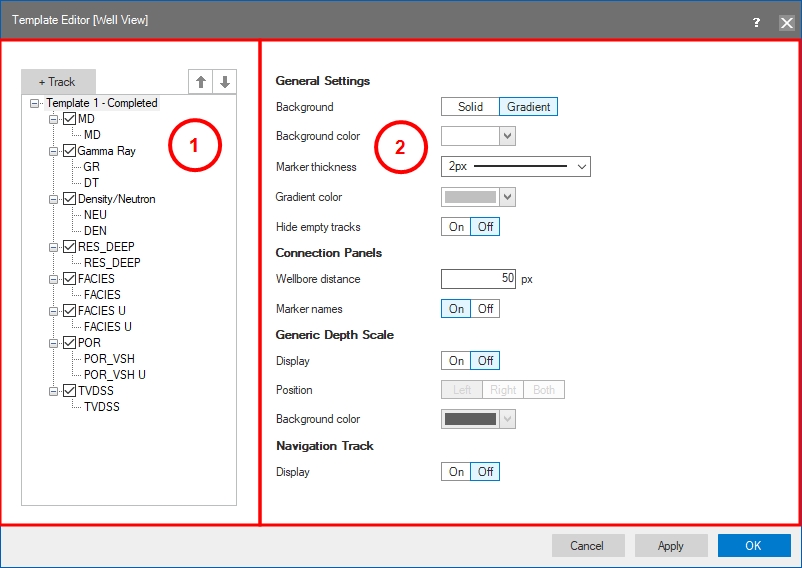
The Template Editor with the Track Explorer (1) and the settings pane (2). click to enlarge

|
Move Up - Click on the icon to move the selected log up inside the table. This will also change the position of the log in the summation track. |

|
Move Down - Click on the icon to move the selected log down inside the table. This will also change the position of the log in the summation track. |

|
Delete - Click on the icon to delete the selected log from the table. |
Display Name - Name that is displayed in the track header in the Well View. Double click on a name to change the display name.
Color - Color that is used to display the log in the Well View. Click in the cell to activate a drop-down menu where you can adjust the color.