Simplifying
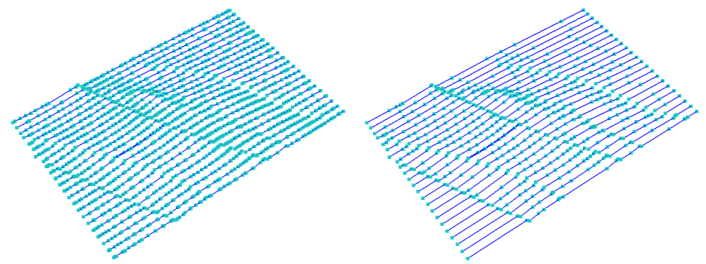
Simplify polyline set: Input polyline set and resulting polyline set click to enlarge
Use Simplify to simplify the selected polyline sets by ‘straightening out’ parts of the polyline where many points occur closely together.
Simplification reduces the number of nodes in the polyline while changing the polyline curvature only within a specified tolerance range (for example, you can remove nodes on a straight line). You can select which polyline sets to simplify, and the vertical and lateral tolerance to use for the simplification.
After simplifying polyline sets, if you find that too many nodes were removed, you can use the Refine tool to add nodes back to the polyline set. You can find the Refine tool in the Smoothing button group of the Polyline Set Tools.
- At the top of the form, select a source from the 'Source' drop-down list. This selection populates the table below.
- From the list of the available polyline sets in the selected source, select the polyline set(s) to modify by checking the individual check boxes.
-
Define a lateral and a vertical tolerance that, together, defines whether a point remains in the polyline or is discarded.
The simplification uses an algorithm (Douglas – Peucker algorithm) whose purpose is, given a curve composed of line segments, to find a similar curve with fewer points. The algorithm defines 'dissimilar' based on the maximum distance between the original curve and the simplified curve. By varying the lateral and vertical tolerance values, you can influence the applied dissimilarity and thus the resulting polyline shape in 3D. Since the values you specify are not straightforwardly recognizable in the result, try out the defaults and some other values to see which give you the best fit.
Lateral tolerance Value that relates to the change in polyline curvature that the simplification will allow in the lateral direction.
Vertical tolerance Value that relates to the change in polyline curvature that the simplification will allow in the vertical direction.
Discarded nodes are removed from the input polyline sets. You can also apply the polyline set simplification during triangulation. The nodes are not removed from the input polyline sets and stay intact. However, they are ignored during triangulation.