Local flexures due to incomplete horizon clean-up
In the 3D structural modeling workflow, you may encounter situations in which the created horizons do not show the anticipated offset. There may be local flexures where the horizons are dragged up or downwards (see figure below). These flexures can have multiple causes, see section 'Cause' below.
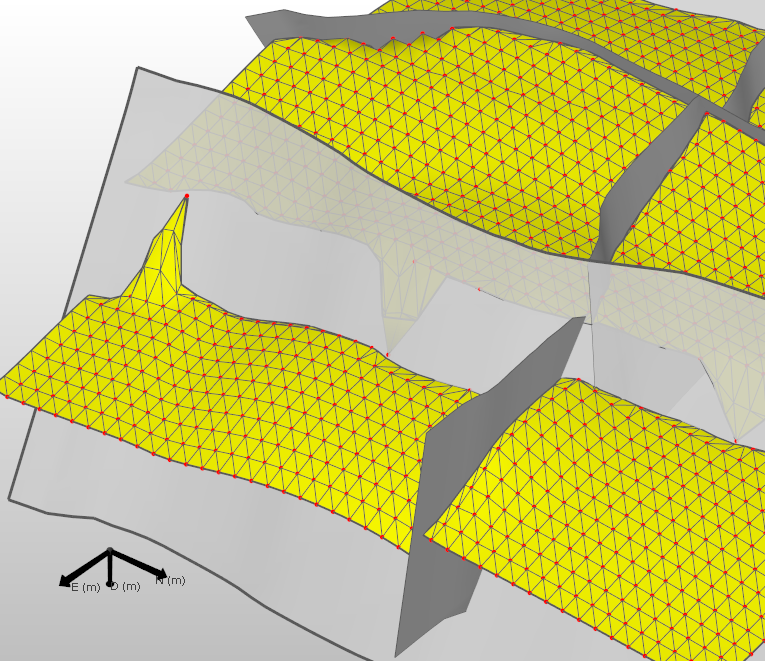
Local flexures rather than the anticipated offsets on both sides of the fault. The tri-mesh result of the 3D structural modeling is in yellow. The red nodes are the data points from the 2D grid which was used as the input. Note that some of the nodes stick through the faults click to enlarge
Where encountered
- model > 3D Structure > Construct Surfaces
- model > 3D Structure > Fault Cutoff Line Edits
Cause
Local flexures can manifest themselves at different stages during modeling and can have multiple causes:
- Not covered in this section:
- Covered in this section: flexures due to incomplete horizon clean-up
This section discusses local flexures as a result of incomplete horizon clean-up, where a node located on the other side of a fault leads to local pulls (up or down).
How to fix the issue
To avoid creating local flexures, you can use the Horizon Clean-up tool, or manually edit the surfaces.
The strongly recommended approach is to use the Horizon Clean-up tool and select an appropriate clean-up distance in which you ensure that nodes close to the fault surfaces (whatever side they fall on) are set to 'inactive'. Such nodes will be ignored by the gridder.
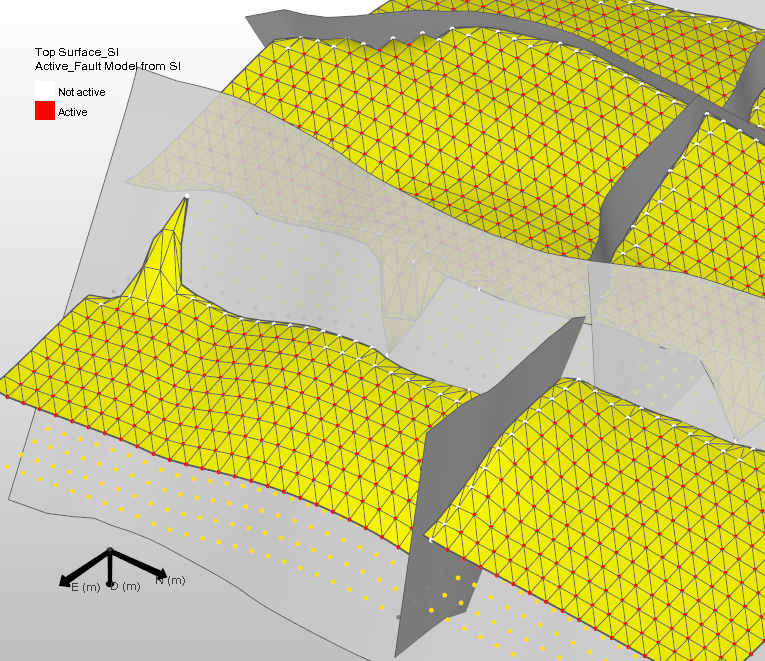
The Horizon Cleanup has been applied to the input material (the color scheme has been changed slightly to make this more obvious). Active data points are shown in red and inactive data points in white. The points sticking through the fault are displayed in white. The changes have not yet been applied. The results are shown in the next image click to enlarge
You can also use manual editing to remove the data in the close proximity of the fault. Any items sticking through the fault should be either removed or set to inactive.
Result
When you have removed data sticking though the fault or used appropriate Horizon Cleanup distances, nodes which could potentially be misinterpreted with respect to their location to the fault are likely to be excluded from the gridding operation. A successful gridder result is shown below.
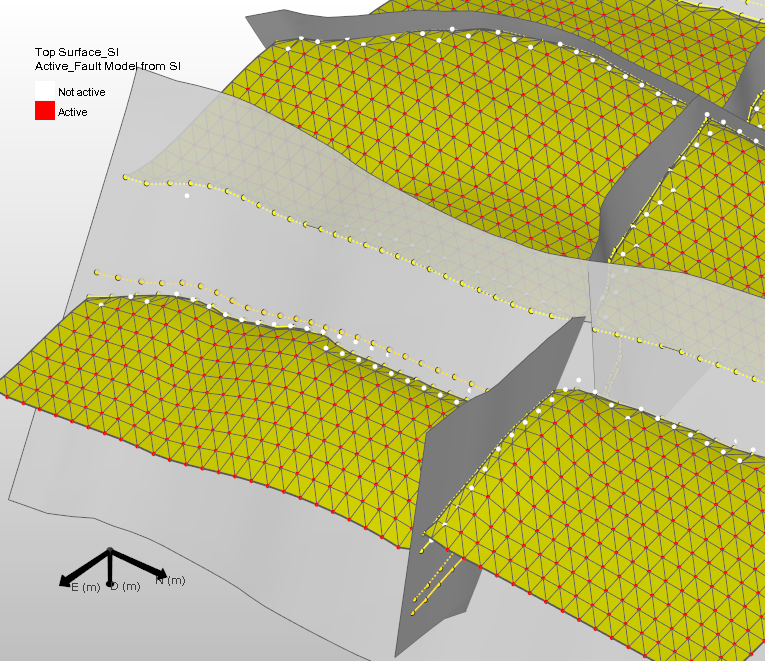
Result of the Construct Surfaces run. Here, only the red (active) nodes were taken in consideration and produce an output horizon without artifacts click to enlarge